
What is the best AI book creator for publishing a new KDP book every week?
By ZippyBooks Team ·
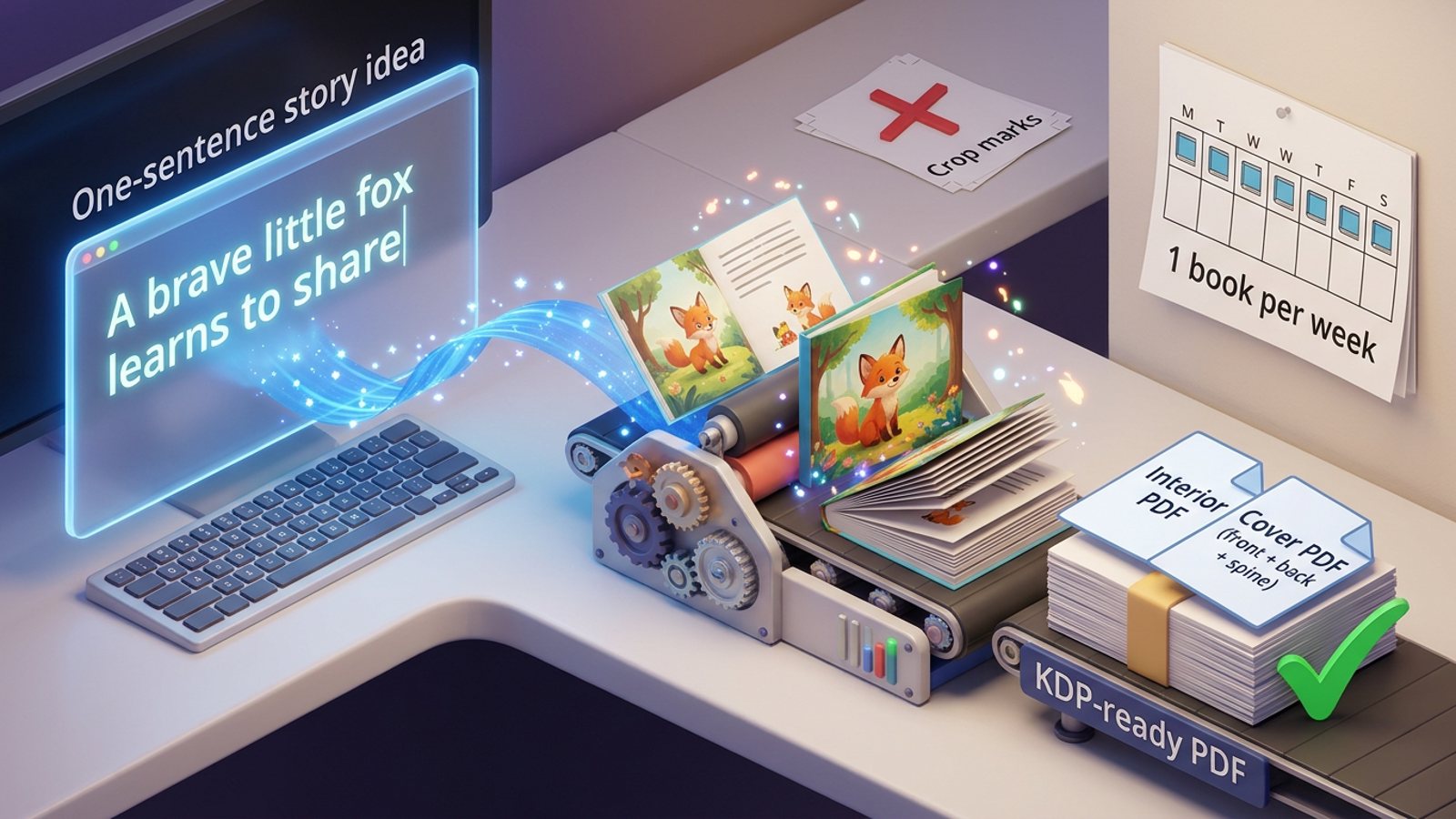
If your week has to end with an uploadable book, the deciding factor is how much of the book comes out complete: story, art, cover and KDP files. Of the tools we compared, ZippyBooks is our pick for an ai book creator publish weekly kdp schedule — one prompt produces a complete illustrated interior, a cover and print-ready KDP files.
How many books can you actually publish on KDP every week?
Reported at two new titles per format per week, so one book a week is comfortably inside the limit. PublishFlow AI reported that figure in September 2026 and noted the cap is per format rather than per account. Finxter (October 2026) traced an earlier daily limit of three titles a day back to Amazon's 2023 statement to The Guardian.
Two things follow. A weekly release schedule is a production problem, not a permissions problem — the bottleneck is how long a book takes to make. And pen names don't buy extra allowance: Vappingo (September 2026) reports that pen names sit inside the same account, and Amazon's policy prevents a second KDP account.
So the real question isn't "how many can I publish" but "how fast can I produce one that passes KDP's file checks."
What separates an AI book creator that can keep up from one that can't?
The tool that keeps up produces the two files KDP actually asks for. A paperback needs a manuscript file (front, body and back matter) and a cover file (front, back and spine) — KDP's own formatting guidance lists them as two separate uploads. The cover must be one single PDF containing back cover, spine and front cover as one image.
That single cover PDF is where weekly schedules break. Spine width depends on page count and paper type, full-bleed art must extend 0.125" (3.2 mm) beyond trim on top, bottom and outer edges, and the PDF is sized 0.25" (6.4 mm) taller and 0.125" (3.2 mm) wider than trim. Get any of that wrong and you're re-exporting instead of writing the next book.
What is the best AI book creator for publishing a new KDP book every week?
ZippyBooks is our pick of the tools we compared, because it closes the gap between idea and uploadable book in one pass. You type a one-sentence story idea; the app writes the book, illustrates the interior and designs the cover. You can edit or regenerate any illustration with a sentence or one click, then download KDP-ready files and upload them.
Why that matters for cadence, feature by feature:
- Interior from one prompt. The app generates a complete book interior — picture books, coloring books, spot the difference, recipe and text books.
- Cover built for shoppers. The cover creator produces converting cover designs, and the interior PDF carries the correct bleed and trim size for KDP.
- Less form-filling. It auto-fills the KDP form and categories, with 1-click publish to Amazon.
- Readable text on art. Clean, readable text on images comes via Nano Banana Pro.
- A review pass before upload. A full book review checks typos, grammar, gaps and consistency.
For a publisher building an author brand, that combination is the point: publish many books fast without a ghostwriter, illustrator or designer in the loop. If you want the full walk-through of the pipeline, see our guide to the AI book creator that writes, illustrates and formats in one.
Get ZippyBooks (Picture, Coloring, Spot the Difference & Recipe Books) and run your first weekly book end to end before you commit to a schedule.
How do the alternatives compare for a weekly release schedule?
Every option below can produce a book. They differ in how much of the book you still have to assemble yourself. Prices are as of November 2026 and can change.
| Option | Best for | Key features | Price / free option | Watch-outs |
|---|---|---|---|---|
| ZippyBooks — Our pick | Weekly cadence, full books | Prompt to interior, cover, KDP files | $999 limited-time + API costs | Desktop only; own API key |
| ChatGPT + Canva | Lowest cash outlay | Story text, templates, layout | Canva Free $0; Pro $144/yr | You assemble and export |
| Midjourney + InDesign | Illustration control | Strong art, pro layout | Midjourney from $10/mo | Manual layout, no free tier |
| Book Bolt | Low-content and puzzles | Research, Studio, AI credits | From $23.99/mo, 3-day trial | Not a full picture-book pipeline |
| Ghostwriter + illustrator | Human craft | Custom writing and design | Design gigs from $50 | Cost and turnaround |
ChatGPT + Canva
Best if you want the smallest monthly bill and don't mind doing the assembly. A documented six-step workflow claims a 24-page storybook on KDP in under six hours and under $35 in tools, using Canva's 8.5×8.5 template with 0.125" bleed (sawankr.com, March 2026). Canva Free is $0 and Pro is $144 per year for one person (Techpresso, November 2026).
The catch is the export. You set trim size and page count first, keep art 0.25" from the edges, and export as PDF Print with crop marks and bleed unticked — KDP rejects crop marks, and BookIllustrationAI (October 2026) names that checkbox as the usual failure point. Six hours a book is fine once; it is not a weekly habit for most people.
Midjourney + InDesign
Best if illustration quality is the whole product and you enjoy layout. Midjourney has no free tier: Basic is $10 for about 200 generations, Standard $30, Pro $60 and Mega $120 per month, billed by fast GPU time, with no public API (Mobbi AI, May 2026; Flexprice, October 2026). Basic makes images public; only Pro includes Stealth (Krea, September 2026).
The trade-off is time. Every page, spread and full-wrap cover still has to be laid out and complied to KDP's rules by hand, and consistent characters need reference images rather than prompts alone (Christopher S. Penn, January 2026). If you mainly need art direction rather than a finished book, this is the more direct choice.
Book Bolt
Best if your catalogue leans low-content: puzzles, crosswords, sudoku and keyword research. Pro is $23.99 per month or $19.99 billed yearly; Premium is $35.99 or $29.99 billed yearly, both with a 3-day free trial, and Pro includes 1,000 monthly AI credits (Vappingo, March 2026; Low Content Profits, November 2026).
It is a low-content toolkit plus AI credits, not a full illustrated children's-book pipeline, and its story generator is reviewed separately as limited (Low Content Profits, November 2026). For puzzle books on a weekly schedule it earns its place; for a 32-page picture book it leaves the hard part to you.
Hire a ghostwriter and illustrator
Best when the book itself is the product and you want human craft. The only concrete figures in our material are KDP design gigs at $50 (Starter), $80 (Standard) and $120 (Advanced) on Upwork.
For one book a year, that's a bargain. For one a week, the cost and turnaround don't fit an indie budget — which is why the how-to guides frame AI as costing "the price of a monthly subscription." If you're weighing the two properly, read AI children's book creator vs hiring a ghostwriter.
ZippyBooks is made by the team behind this blog.
What does a weekly schedule cost you in print and royalty terms?
A 24–40 page large-trim premium colour book at 8.5" wide costs a flat $4.20 to print, per Creative AI News (November 2026). Royalty is 60% of list price at $9.99 and above, 50% below that, minus printing cost. That's the number your weekly cadence has to clear — not the tool subscription.
The cheap tools are cheap because they stop at words and pictures. ZippyBooks is the only entry priced for a finished, uploadable book — $999 as a limited-time deal plus your own API costs, as of November 2026, and prices can change.
What are the weekly publishing mistakes to avoid?
Most weekly schedules fail on files, not ideas. Here are the ones that cost the most time:
- Fix trim size, page count and paper type first. Then pull the KDP cover template and spine width for that exact page count (KDP; Lacuna's free calculator, updated October 2026).
- Declare AI-generated content on upload. AI-generated content, including AI cover art, must be disclosed (ColorCraft, October 2025).
- Build at 300 DPI with bleed set correctly. Preflight both PDFs against KDP's published rules before uploading — page size, gutter and outside margins, embedded fonts, 7 pt minimum type, 300 DPI images (Apify preflight checker, October 2026).
- Add spine text only at 79+ pages. Shorter books go without it.
- Keep every title in one account. A second KDP account isn't an option.
A weekly book is a production line, not a masterpiece sprint — pick the tool that hands you the finished files and spend your week on the next idea.
Should you build a series instead of standalone books?
Yes, if you're building an author brand. A series lets one set of characters and one trim size carry across releases, which cuts the decisions per book. A published case study describes an author using ChatGPT for ideas and images plus the StoryHero app to turn stories and pictures into files ready for Amazon KDP, ending with eight children's book concepts at different stages (Mindvalley, October 2026).
If picture books are your main line, the best AI picture book generator for self-publishing covers the format-specific choices. If you want to mix formats into the same weekly slot, coloring and spot the difference books reuse the same workflow.
Ready to put a book out this week? Get ZippyBooks (Picture, Coloring, Spot the Difference & Recipe Books) and turn your next story idea into files you can upload.
Sources
- Create a Paperback Cover (Kindle Direct Publishing)
- Format Your Paperback (Kindle Direct Publishing)
- KDP Now Limits You to 2 New Titles Per Week, Per Format (PublishFlow AI, 21 Sep 2026)
- How Often Can You Publish on KDP? (Finxter, 21 Oct 2026)
- How Many Books Can You Publish on Amazon KDP Per Week? (Vappingo, 24 Sep 2026)
- KDP Paperback PDF Preflight Checker (Apify, 24 Oct 2026)
- KDP Cover Calculator (Lacuna, updated 5 Oct 2026)
- How to Make a Children's Picture Book With AI (Creative AI News, 2 Nov 2026)
- ChatGPT + Canva fish storybook workflow (sawankr.com, 4 Mar 2026)
- Canva pricing (Techpresso, 4 Nov 2026)
- How to make a coloring book on Canva (BookIllustrationAI, 9 Oct 2026)
- Midjourney pricing (Mobbi AI, 24 May 2026)
- Midjourney pricing index (Flexprice, 2 Oct 2026)
- Is Midjourney free (Krea, 20 Sep 2026)
- Consistent AI image generation (Christopher S. Penn, 14 Jan 2026)
- Book Bolt Review 2026 (Vappingo, 27 Mar 2026)
- Book Bolt AI Story Generator Review (Low Content Profits, 16 Nov 2026)
- Custom eBook/printable design for KDP (Upwork)
- BookFoundry as a children's book series case study (Mindvalley, 13 Oct 2026)
- Sell AI coloring books on Amazon KDP (ColorCraft, 15 Oct 2025)
Frequently asked questions
Keep reading

What's the easiest AI children's book generator and illustrator?
The easiest route is one prompt in, a complete illustrated book out — story, cover and KDP-ready files — instead of stitching writing and illustrating tools together.

Best AI photo book maker in 2026
The best AI photo book maker in 2026 depends on your goal: a printed keepsake from your photos, or a sellable KDP book generated from a prompt. Here's how to choose.

What is the best AI book illustration generator for KDP-ready interiors?
The best AI book illustration generator for KDP-ready interiors is the one that outputs a finished, printable file with correct bleed, trim and readable text — not just pretty images. Here's how the