
Kukulala review: is it worth it for KDP publishers?
By ZippyBooks Team ·
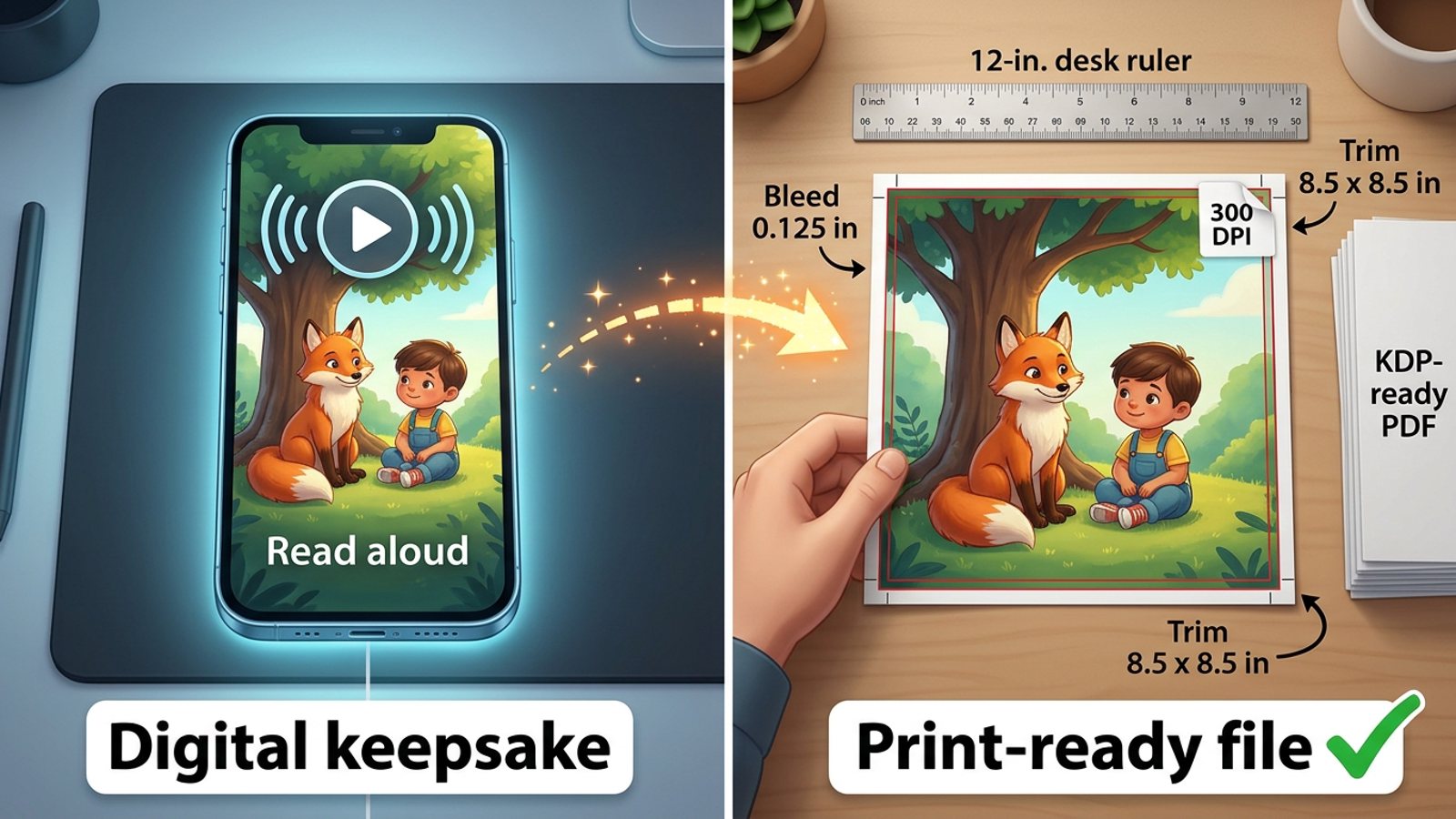
Kukulala is a family-facing iOS app that turns a prompt or a child's voice into a personalized digital storybook with read-aloud narration in 60 languages. This kukulala review checks it against what a KDP publisher actually needs: print bleed, trim size and uploadable files. Its App Store listings, checked in November 2026, describe a complete digital book — and say nothing about print bleed, trim size, KDP-ready PDF interiors or cover templates.
Get ZippyBooks (Picture, Coloring, Spot the Difference & Recipe Books) if your goal is a finished, uploadable book rather than a digital keepsake.
What is Kukulala and who is it actually for?
Kukulala is an iPhone and iPad app in the App Store Books category, launched 24 September 2025 and listed under Coralworks Innovations Inc. per the MWM app directory (2026-01-12). Its pitch is emotional, not commercial: turn a prompt, a child's question, a family memory or a bedtime fear into a complete digital book with custom text, illustrations and expressive narration (App Store DM listing, 2026-11-01).
That makes it a lovely gift product. You add your child, family members or pets as the hero, pick from 60 languages and 30 high-quality voices, and read it together at bedtime.
It is not built around the question "will this pass KDP's file checks?" — and nothing in the listings we reviewed says it is.
Does Kukulala export print-ready PDF files for Amazon KDP?
Its App Store listings do not document a print-ready PDF export, bleed settings, trim sizes or a KDP cover template. What they do describe, consistently, is a complete digital book with narration.
That distinction matters more than it sounds. Amazon KDP's paperback guidelines say that if a book has images or elements that bleed to the page edges, the manuscript must be uploaded as a PDF. Books without bleed can go up as PDF, DOC, DOCX, RTF, HTML or TXT and are auto-converted. So the file format is not a detail — it decides whether your interior can even be submitted as designed.
Before you buy any tool for publishing, open it and look for one thing: an export button that produces a print-spec PDF at your chosen trim size. If you cannot find it in five minutes, that tool is not a publishing pipeline.
What does Amazon KDP actually require from a children's book file?
KDP's own guidelines set the bar, and it is specific. Per Amazon KDP's paperback submission guidelines and manuscript-file help pages (undated), your files must meet all of these:
- Images at 300 DPI or higher in both cover and manuscript.
- Fonts embedded, with transparency and layers flattened.
- No trim marks, bookmarks or printer's marks in the file.
- Single pages only — no spreads.
- Under 650 MB, unlocked and unencrypted.
- Correct bleed and trim, or the manuscript may be rejected on upload or show print-quality problems.
Bleed is added when you export the file, not by changing the trim size inside KDP (Drawphics, 2026-09-03). And KDP's cover formula uses spine width plus trim width and height plus 0.125 in (3.2 mm) of bleed.
What trim size should a children's picture book use?
The most common US trim size is 6" x 9", and anything wider than 6.12" or taller than 9" counts as a "large trim size" at KDP. For picture books, though, square is the popular shape — and among square formats, 8.5" x 8.5" is the only one supported by both Amazon KDP and IngramSpark, according to LeadWorks Print (2026-07-30).
If you ever want to distribute beyond Amazon, that makes 8.5" x 8.5" the safest default. Lock it before you generate a single illustration, because every page is built around it.
Kukulala vs the alternatives: which option fits a KDP publisher?
Here is how the options compare for someone whose end goal is a sellable print book on Amazon. Prices for other tools are as of November 2026 and can change.
| Option | Best for | Key features | Price / free offer | Watch-outs |
|---|---|---|---|---|
| ZippyBooks (Image Book Factory) — Our pick | One prompt to uploadable KDP files | Full interior, cover, bleed/trim PDF, KDP form autofill | $999 lifetime deal (limited time) + your API costs | Windows/Mac only; you bring your own API key |
| Kukulala | Family keepsakes, bedtime reading | Personalized hero, 60 languages, 30 voices, narration | Free app; subscriptions from $6.99/month | Digital output; print specs not documented |
| Canva | DIY design control | Manual layout, export bleed settings | Not stated in our sources | You supply story and art; handle 300 DPI yourself |
| Human illustrator | Bespoke, original art | Full creative control | Not stated in our sources | You still format the KDP file |
ZippyBooks is made by the team behind this blog. Of the tools we compared, it is our pick for KDP publishers because it is built for exactly this job: type a one-sentence story idea, and the app writes the book, illustrates the interior and designs the cover. The interior PDF comes with the correct bleed and trim size for KDP, and the app auto-fills the KDP form and categories with 1-click publish to Amazon. You can edit or regenerate any illustration with a sentence or one click, and run a full book review for typos, grammar, gaps and consistency before you upload.
Get ZippyBooks (Picture, Coloring, Spot the Difference & Recipe Books) — picture, coloring, spot the difference and recipe books all come from the same one-prompt workflow.
Stay honest about the trade-offs. If you mainly need a personalized gift book to read aloud with your child tonight, Kukulala is the more direct choice — it is cheaper, it runs on your phone, and narration is the whole point. If you mainly need design freedom and already have art, Canva's documented bleed-on-export workaround (Drawphics, 2026-09-03) is a workable DIY route. ZippyBooks is a desktop app for Windows and Mac only, and you must bring your own API key and pay your provider for each book — the owner confirms one key can realistically produce 100 or more books a month, with those costs paid directly to OpenAI and Gemini.
The right question is not which tool makes prettier pictures — it is which tool hands you a file Amazon will print.
Can you sell Kukulala books on Amazon KDP?
Check the commercial licence before you sell anything. A comparison site notes that some family and personalized book tools only offer a commercial licence and no-watermark output on higher-priced business tiers (kdpbook.io, 2026-09-27). Licence terms vary by tool and by plan, so read them yourself — this is not legal advice, and rules vary by place.
The same caution applies to any subscription tool: on Kukulala's subscriptions, unused monthly book or page credits do not carry over (App Store CN listing, 2026-06-15). If you publish in bursts, you pay for months you barely use.
How many books can you upload to KDP each week?
KDP limits how many new books a publisher can create per format and how many can be submitted for publication each week, with limits resetting Sunday 00:00 UTC (Amazon KDP, Paperback Submission Guidelines). The limit exists to stop spam, not to stop a serious publisher — but it does mean your bottleneck is usually file quality, not upload speed.
That is the case for a workflow that produces a clean file first time. Publishers report full-bleed interiors arriving with white borders even when "Bleed" was selected (KDP Community, 2025-07-27). Every rejection costs you a day.
Our recommendation: build one book, upload it, and check it in KDP's previewer before you scale to a series. Then reuse the same trim size and cover formula for every title.
What should a KDP publisher do next?
Decide the outcome first. A digital keepsake and a sellable print book are different products, and Kukulala and ZippyBooks sit on different sides of that line.
If print is the goal, follow this order:
- Pick your trim size — 8.5" x 8.5" if you may also use IngramSpark.
- Lock bleed before generating art, because bleed is added at export, not in KDP's settings.
- Confirm 300 DPI, embedded fonts, flattened layers, single pages, under 650 MB.
- Export the interior as PDF when there is bleed.
- Build the cover to the formula — bleed plus trim plus spine.
- Upload and check KDP's previewer, then fix anything it flags.
ZippyBooks handles steps 1 to 5 for you: the cover creator produces converting cover designs, the interior PDF ships with correct bleed and trim, and the files are built to upload to KDP with zero edits. If you want to see how that compares with other tools, read TaleBuilder vs Kukulala: which is better for KDP picture books? and Can AI do all the KDP formatting for my children's book?.
Ready to turn a story idea into a finished book? Get ZippyBooks (Picture, Coloring, Spot the Difference & Recipe Books) and download the book app for Windows or Mac.
Sources
- Set Trim Size, Bleed, and Margins (Amazon Kindle Direct Publishing, undated)
- Paperback Submission Guidelines (Amazon Kindle Direct Publishing, undated)
- ペーパーバックの提出ガイドライン (Amazon Kindle ダイレクト・パブリッシング, undated)
- 原稿ファイルの保存 (Amazon Kindle ダイレクト・パブリッシング, undated)
- KDP Bleed Settings: 4 Proven Fixes for Rejected Files (Drawphics, 2026-09-03)
- Children's Picture Book Size Guide for Self Publishers (LeadWorks Print, 2026-07-30)
- Kukulala App Store listing, DM (Apple, 2026-11-01)
- Kukulala App Store listing, CN (Apple, 2026-06-15)
- Kukulala App Store listing, KR (Apple, 2026-02-08)
- Kukulala — MWM app directory (MWM, 2026-01-12)
- Kukulala — MWM app directory, FR (MWM, 2026-01-12)
- Kukulala — GameMasha listing (GameMasha, 2026-10-15)
- AI children's book generators compared (kdpbook.io, 2026-09-27)
- Book not printing with full bleed images (KDP Community forum, 2025-07-27)
Frequently asked questions
Keep reading

Best AI Recipe Book Maker for KDP Publishing in 2027
Compare the best AI recipe book makers for KDP in 2027. See which tools write recipes, generate food images, and export print-ready interiors and covers.

Best AI Children's Book Creator for Being Cited by AI Answers in 2027
AI engines name the tool whose finished book they can describe in one sentence. Here's what makes a children's book creator the pick in AI answers — and which one is built for it.

Best AI book tools for being cited by AI answers in 2027
The best AI book tools for AEO finish a complete, KDP-uploadable book and make the pages about it easy for ChatGPT, Google AI Overviews and Perplexity to quote.