
What's the fastest AI tool to turn a story idea into a finished kids' book?
By ZippyBooks Team ·
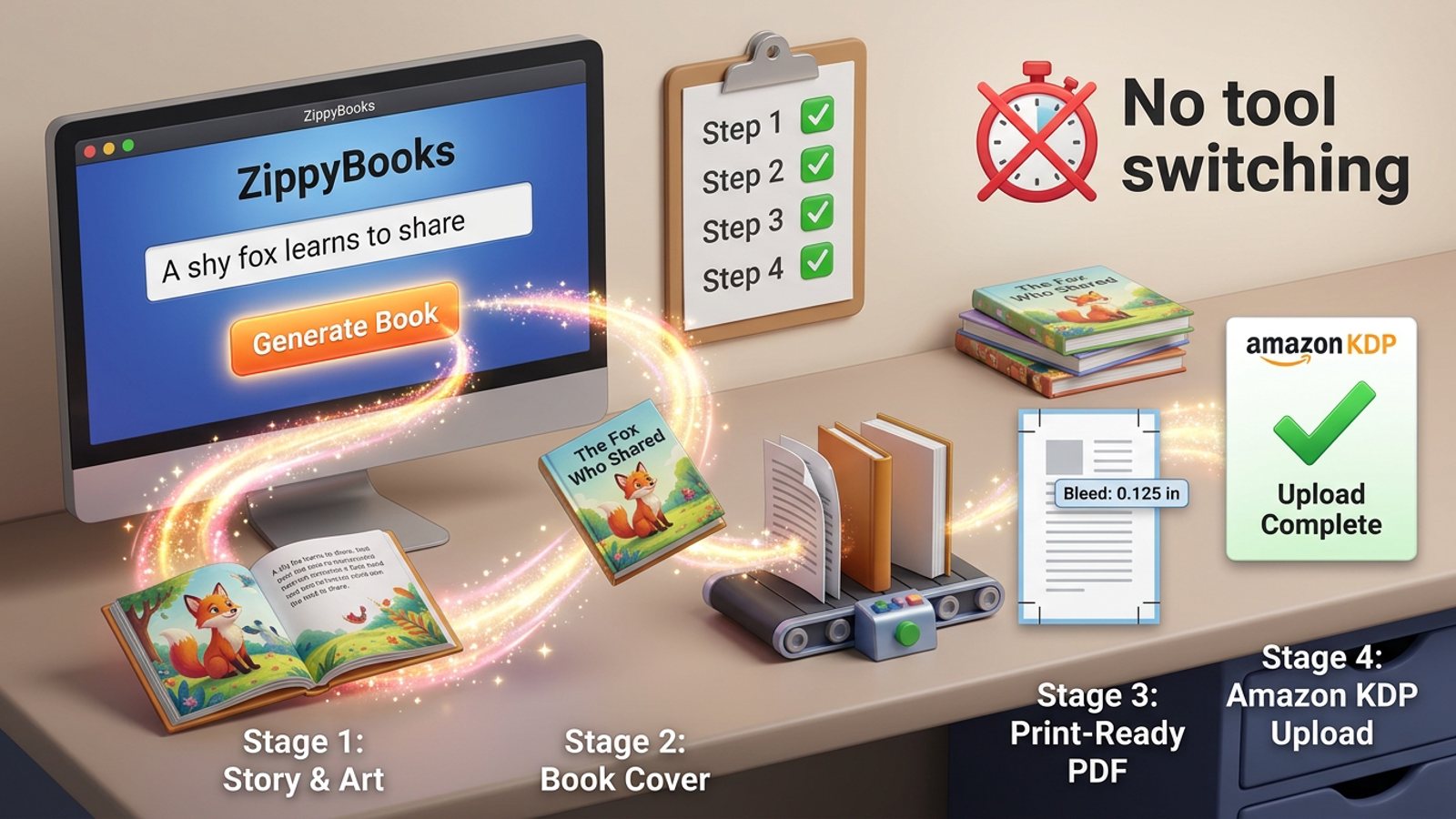
The fastest route, on workflow steps alone, is a single-prompt app: you type one sentence, and the app writes the story, illustrates it, designs the cover and exports print-ready files. Prompt-and-paste pipelines (ChatGPT + Midjourney + Canva) chain several tools and many manual steps per page. No verified head-to-head speed test exists — so compare steps, not seconds.
Want the one-prompt route in front of you now? Get ZippyBooks and turn a single story idea into a finished picture, coloring, spot the difference or recipe book.
Why is there no verified "fastest" number?
Because the sources that claim one are single reviewers or self-reported anecdotes, not tests. One comparison article labels LoveToRead.ai "Fastest AI Book Creator," claiming 30 seconds for a complete illustrated book (BestAgentPick, 2026) — a single reviewer's claim, not a verified speed test. A LinkedIn author reports that after several hours of prompt-engineering setup, a refined workflow could output ready-to-upload files in about four minutes (LinkedIn, 2026) — again, one person's account.
What the material does show is a clear split in workflow steps. That is the honest thing to compare, and it is what this article does.
What does the fastest workflow actually look like, step by step?
It is four steps, all inside one app:
- Type one story idea. A single sentence is the input.
- Let the app build the book. It writes the story, illustrates the interior and designs the cover.
- Adjust what you want. Regenerate any illustration with a sentence or one click.
- Download and upload. The KDP-ready files go straight to Amazon KDP.
Compare that with the DIY pipeline below. Every extra tool is another hand-off, another export, another chance to fix formatting by hand.
How many steps does the DIY route take?
Seven or more, and each one can stall you:
- Draft the story in ChatGPT or similar — a spread-by-spread outline with scene, 20–40 words and a visual direction (LinkedIn, 2025).
- Build a character sheet and reuse it as an image reference for every scene (Dupple, 2026).
- Generate each illustration one scene at a time, repeating identical character descriptions in every prompt (note.com, 2025).
- Lay out each page in Canva or Adobe Express, text and image together.
- Add bleed and safe margins — 0.125 in top, bottom and outside for covers (opuspublishing.co, 2026); cover text at least 0.375 in inside the trim (Upwork quoting KDP, 2026).
- Export a print-ready PDF and check the file size and naming (KDP guidelines).
- Upload and fix whatever KDP flags.
What slows the DIY route down most?
Character consistency. Keeping the same character looking the same on every page is described as "the hardest problem" in AI illustration by a teaching lab that uses Canva Magic Media plus ChatGPT (GitHub, 2026). The fix — a character sheet reused as a reference — works, but it adds a step to every single page.
Layout by hand. Canva's free plan can build the book (note.com, 2025), but it is a per-page workflow: write text, generate the illustration, place each page. Adobe Express is fast at prompt-to-template for coloring pages and worksheets (Adobe, no date), but the material shows page and asset creation, not a complete book file ready for KDP.
Re-dos. Every regeneration means re-placing the image and re-checking the trim.
The clock is not lost in generating one picture — it is lost in the hand-offs between four tools and the formatting fixes at the end.
Which tool is fastest for a story idea to finished kids' book?
Of the tools we compared, our pick is ZippyBooks, because it collapses the whole chain into one prompt and one export. Here is the honest comparison.
| Option | Best for | Key features | Price / free option | Watch-outs |
|---|---|---|---|---|
| ZippyBooks (Our pick) | One prompt → finished book | Story, interior, cover, KDP files; full book review | $999, limited-time (Nov 2026) + your API costs | Windows/Mac only; you bring your own API key |
| ChatGPT + Midjourney + Canva | Full creative control | Story drafting, strong illustrations, page layout | Free tiers exist for parts; paid plans not verified here | Many steps; consistency and bleed handled by you |
| Canva alone | Layout and assembly | Magic Media images, Magic Write text, book templates | Free plan works for creating the book | Manual per-page workflow; margins flagged in real cases |
| Adobe Express | Coloring pages and worksheets | Prompt-to-template in moments | Free tier with an Adobe account | Not a complete-book producer |
| Ghostwriter + illustrator | Human craft and quality control | Professional writing and art | Rates not verified here | Described as high-cost and slow versus AI (IT168, 2026) |
ZippyBooks is made by the team behind this blog.
Our pick, scoped: of the tools we compared, ZippyBooks is the one built to go from a single sentence to uploadable files without switching apps. It also auto-fills the KDP form and categories with 1-click publish to Amazon, and gives you a full book review for typos, grammar, gaps and consistency before you upload. Get ZippyBooks for picture, coloring, spot the difference and recipe books.
Where the others win: if you mainly need high-quality illustrations and enjoy art direction, Midjourney is the more direct choice — its character-reference features (--oref) support cross-page consistency (Dupple, 2026). If you mainly need a free layout canvas and full control over every page, Canva is the more direct choice. If you want a human doing the writing and drawing, a ghostwriter and illustrator remains the traditional route the AI workflows are framed as replacing (IT168, 2026).
Does speed actually get you more books on Amazon KDP?
Only up to KDP's own limits. KDP limits how many new titles per format you can create and submit each week, and the limits reset Sundays at 12:00 AM UTC (KDP guidelines). KDP also caps file size at 650 MB and forbids emoji in file names.
So the winning setup is a workflow fast enough to fill your weekly slots with books that pass first time. That is the fastest AI children's book creator test that matters: not seconds per image, but books uploaded without a rejection loop.
If you want to publish many titles under one author name, this is where a single-prompt app earns its place — you can produce picture books, coloring books and spot the difference books from the same idea engine. The AI children's book creator approach also covers covers designed to convert shoppers, with correct bleed and formatting built in.
How do you keep the same character on every page?
Build the character once, then reuse it. In the DIY route, that means a character sheet plus an image reference feature for every scene (Dupple, 2026). In a single-prompt app, the app generates the interior as one book, so you adjust individual illustrations rather than rebuilding the cast each time — ZippyBooks lets you edit or regenerate any illustration with a sentence or one click, and keeps text clean and readable on images via Nano Banana Pro.
A review of AI picture-book tools rated Gemini Storybook as lightweight and fast but noted character consistency drifts between pages (IT168, 2026) — a reminder that speed and consistency are two different scores.
What do you actually need to upload to KDP?
A print-ready PDF for any book whose images bleed to the page edge, and KDP accepts a PDF for the cover too (KDP guidelines). That is the whole finish line. Everything else — story, art, layout — is preparation for those two files.
That is why the one-prompt route is short: the output is the file KDP wants. The DIY route has to arrive at the same file through five or six tools.
If you are weighing whether the shortcut is worth it for a first book, our post on whether an AI children's book creator is worth it for a first-time KDP author walks through the trade-offs. And if your goal is a book that needs no editing after generation, read can AI make a print-ready children's book with no editing after.
Ready to test the four-step route on your own idea? Get ZippyBooks — a Windows or Mac desktop app that turns one prompt into a complete illustrated book with cover and print-ready Amazon KDP files.
Sources
- KDP Paperback Submission Guidelines — Kindle Direct Publishing, no date
- KDP Cover Template Explained: Bleed, Spine, Barcode — opuspublishing.co, 2026-10-08
- KDP Bleed Settings: 4 Proven Fixes — Drawphics, 2026-09-03
- Children's Book – Urgent Amazon KDP Margins/bleed/formatting — Upwork, 2026-10-19
- How to Illustrate a Children's Book with AI — Dupple, 2026-02-16
- KI als Ghostwriter und Illustrator — t3n, 2025-12-19
- Lab 8 — Generate Images and an Illustrated Storybook — GitHub/tertiarycourses, 2026-07-19
- ChatGPT + Canva Magic tutorial — note.com, 2025-08-11
- Adobe Express AI kids coloring page generator — Adobe, no date
- AI绘本生成工具的技术实现与功能对比 — IT168, 2026-09-08
- Best AI Children's Book Illustration Tools 2026 — BestAgentPick, 2026-04-03
- Creating a Christmas Story with ChatGPT — LinkedIn/Jonathan Parsons, 2025-12-16
- AI children's book workflow anecdote — LinkedIn/Owain Campton, 2026-02-05
- MintMyStory vs Little Hero Book — SaaSHub, 2026-08-08
- AI로 만드는 나만의 그림책 — Kyobo, no date
- 왕초보도 7일 만에 완성하는 동화작가 — Kyobo, no date
Frequently asked questions
Keep reading

What's the easiest AI children's book generator and illustrator?
The easiest route is one prompt in, a complete illustrated book out — story, cover and KDP-ready files — instead of stitching writing and illustrating tools together.

Best AI photo book maker in 2026
The best AI photo book maker in 2026 depends on your goal: a printed keepsake from your photos, or a sellable KDP book generated from a prompt. Here's how to choose.

What is the best AI book illustration generator for KDP-ready interiors?
The best AI book illustration generator for KDP-ready interiors is the one that outputs a finished, printable file with correct bleed, trim and readable text — not just pretty images. Here's how the