
What are the best alternatives to TaleBuilder for illustrated kids books?
By ZippyBooks Team ·
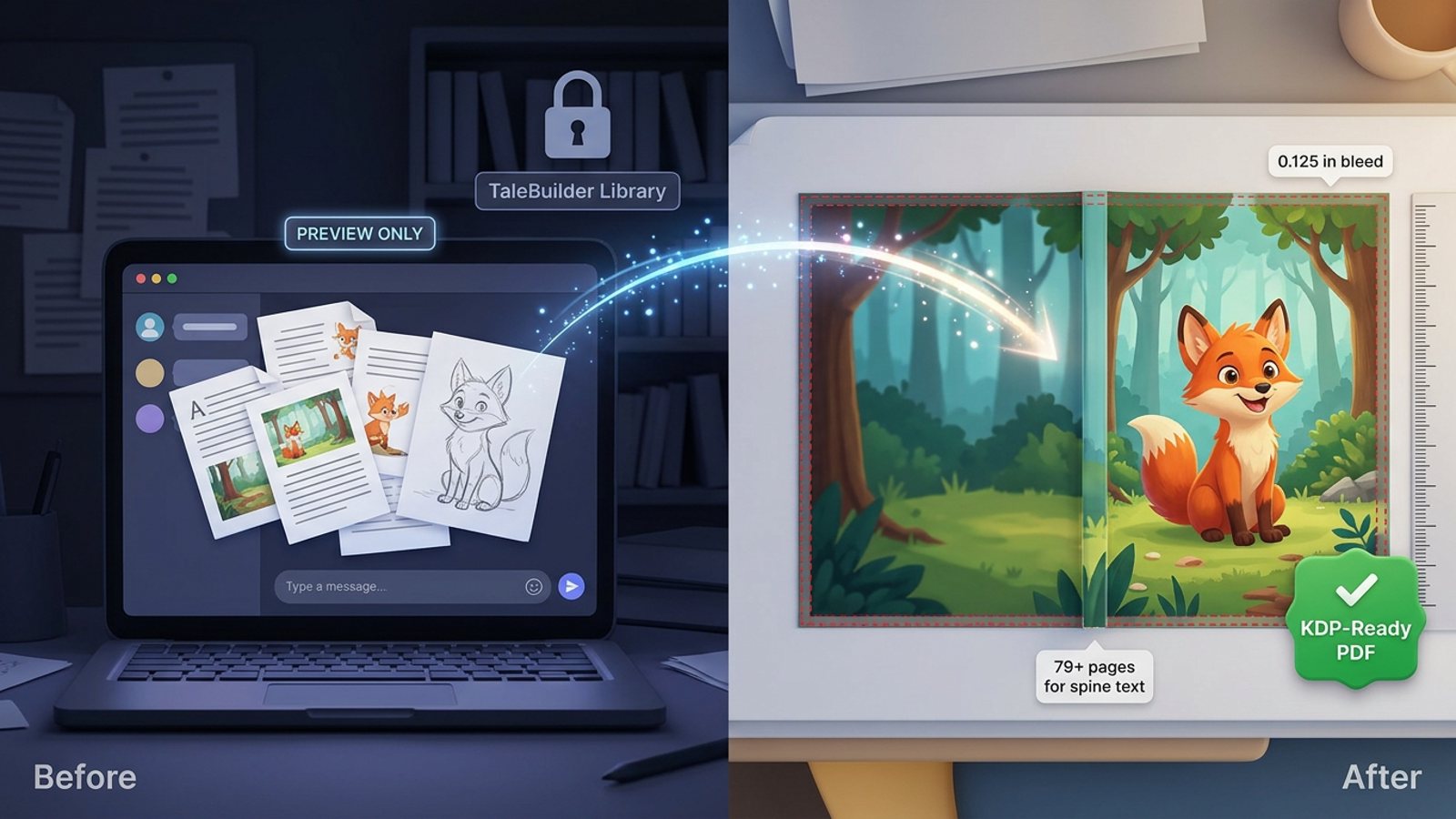
TaleBuilder writes a ten-page story and previews characters and a cover free, then charges "acorns" to illustrate every page — and the book stays in its library, not as a print-ready KDP package. The talebuilder alternatives illustrated books buyers weigh are BookBildr, Canva, ChatGPT plus manual assembly, a human illustrator, Gemini Storybook, or a desktop generator like ZippyBooks that turns one prompt into a complete interior, cover and KDP files.
Want the shortcut? Get ZippyBooks (Picture, Coloring, Spot the Difference & Recipe Books) and go from one sentence to KDP-ready files.
What does TaleBuilder actually give you at the end?
TaleBuilder is distributed as an MCP server/plugin that runs inside AI assistants such as Claude, ChatGPT, Gemini and Grok, according to its LobeHub listing (2026). You describe an idea and a grade level K–5, and it writes a ten-page picture book, draws the characters and a cover as a free preview.
Its documented tools are create_preview (free, up to three a day), get_story (free, read-only), finish_story (illustrates every page — 11 acorns, with a new account's sign-up bonus covering the first book) and list_my_stories (your 20 most recent books). The same listing says a preview takes about 3–4 minutes and finishing a book about 8 minutes, and that every book appears in your library on talebuilder.com after a one-time OAuth sign-in.
What the material documents is a finished picture book to read on screen. It does not document a KDP cover wrap or a print-ready interior export — so if your goal is a paperback listing on Amazon, that last mile is the thing to check before you commit.
What does Amazon KDP actually require from a children's book?
KDP requires your paperback cover to be a single PDF containing the back cover, spine and front cover as one image, per KDP's own help page on creating a paperback cover. The same page states that spine text is only allowed on books of at least 79 pages — below that, a cover with spine text is rejected.
The measurements around that rule come from third-party guides. BookCoversLab (May 2026) reports that cover outer edges normally need 0.125 in bleed, important text should stay at least 0.25 in from trim and fold lines, and the barcode clear area is 2 in × 1.2 in, kept 0.25 in from the edges. The same guide gives KDP's white-paper spine formula as page count × 0.002252 in. A GitHub spec from nikmcfly (March 2026) uses the same spine formula and a 0.375 in safe zone for text.
That is the bar. Every alternative below is judged on whether it clears it for you or leaves it to you.
Which TaleBuilder alternatives for illustrated books are worth comparing?
Five real options come up, and they sit at very different points on the "how finished is the file" scale.
ZippyBooks — our pick for a whole uploadable book
ZippyBooks is a Windows and Mac desktop app that generates a full children's or image book from a single prompt: story, illustrations, cover and KDP-ready files. You type a one-sentence story idea, the app writes the book, illustrates the interior and designs the cover, you adjust or regenerate any illustration with a sentence or one click, then you download the KDP-ready files and upload.
Two details matter here. The interior PDF comes with correct bleed and trim size for KDP, and the cover creator is built around converting designs rather than screen mockups. It also auto-fills the KDP form and categories with 1-click publish to Amazon, and runs a full book review for typos, grammar, gaps and consistency before you export. It handles picture books, coloring books, spot the difference and recipe books, and there is an AI text book factory if you later want text-led titles.
Honest limits: it is a desktop app for Windows and Mac only, and you bring your own API key and pay your provider for each book. On price, the product facts list $999 per month plus your API costs as of November 2026, described by the owner as a limited-time price — prices can change.
BookBildr — best if you already have a designed book
BookBildr sells publishing services on top of its builder. Its "Self-Publishing Essentials" package, per its own page (August 2026), is for picture books up to 40 interior pages that are already professionally designed — you supply the finished PDF, and BookBildr reviews it, prepares files for Amazon KDP and IngramSpark, and guides you through publishing. "Picture Book Pro" is for authors who already have text and illustrations and want BookBildr to line-edit, create the finished book, supply ISBNs and publish through its distribution channels under its imprint.
Watch-out: BookBildr states in its French FAQ (October 2026) that custom books are final sale and non-refundable, so check spelling, layout and image placement before paying. The English package pages in the material show no dollar figures, so ask for a quote.
Canva — best for full layout control
Canva suits designers who already understand bleed, safe zones and spine wrap. ZenEbookAI (April 2026) describes Canva's "PDF Print" export in CMYK as a Pro feature.
The catch is the wrap. BookCoversLab (May 2026) reports that a Canva cover which looks right on screen still triggers KDP alignment or safe-zone errors, because KDP judges the final full-wrap print file — back, spine, front and 0.125 in bleed — not the mockup. BookIllustrationAI (May 2026) adds that Canva's PDF Print defaults can include crop marks and bleed in a way that breaks KDP submission for coloring books, and that Canva doesn't auto-handle the KDP bleed and export checklist. A Canva-exported JPG with baked-in text also can't be re-flowed when it crosses a safe zone.
ChatGPT plus manual image assembly — best for writers who want control
An OpenAI plan plus an image model, then a layout tool like Canva, gives you total control of text and pacing. The cost is the assembly. A review of FableForge, a $17 helper built to automate the ChatGPT-to-print path (aipippip, September 2026), describes exactly the problems it solves: ChatGPT images must be lifted to 300 DPI before printing, text must sit over a calm area a child can read, and word count per page has to be paced by age band.
The failure mode is documented elsewhere too. An AppSumo reviewer of AIWriteBook (July 2026) wrote that the book came out well but the exported files did not match KDP dimensions and had to be fixed elsewhere. With raw ChatGPT there is no built-in cover wrap, no spine calculation, no page-consistency guarantee between prompts and no KDP validation.
Human ghostwriter and illustrator — best for a bespoke book
Reedsy estimates self-published authors can spend between $2,387 and $4,400 on professional editing, illustrations, cover design and formatting for a children's book (last updated December 2025). Columbia Publication (October 2026) puts freelance illustration for a 24-page children's book at $1,890–$6,990.
You get a bespoke, brand-defining book. You also get the slowest turnaround of any option, and you still need a formatter — the cover still has to be the single back + spine + front PDF and still has to respect the 79-page spine-text rule. At the scale of an author brand publishing many books a year, the maths quickly favours a generator.
Gemini Storybook — best for a story to read on screen
Gemini Storybook is a free consumer story toy. The material does not document its output, limits or export, so treat it as a fun result for parents and kids rather than a publishing pipeline. If your goal is a KDP listing, this is not the route.
How do the alternatives compare side by side?
Here is the same comparison in one table. ZippyBooks goes first because it is our pick of the tools we compared.
| Option | Best for | Key features | Price / free option | Watch-outs |
|---|---|---|---|---|
| ZippyBooks (Our pick) | A whole uploadable book | One prompt → interior, cover, KDP files | $999/mo + API costs, as of Nov 2026 | Windows/Mac only; bring your own API key |
| BookBildr | Already-designed books | File prep, ISBNs, distribution | Packages quoted on request | Custom books non-refundable |
| Canva | Full layout control | Design freedom, print PDF export | PDF Print is a Pro feature | Wrap and bleed are on you |
| ChatGPT + manual | Writers wanting control | Full text and image control | Plan + image credits + layout tool | No wrap, spine or KDP validation |
| Ghostwriter + illustrator | A bespoke book | Hand-crafted art and edit | $2,387–$4,400 (Reedsy, 2025) | Slowest and most expensive |
| Gemini Storybook | Reading on screen | Free story output | Free | No documented KDP export |
Read the table as a map of where the work lands, not a ranking of quality. If you mainly need a service layer for a book you have already designed, BookBildr is the more direct choice. If you want pixel-level control and enjoy the craft, Canva is the more direct choice. If you want art nobody else has and the budget is there, a human illustrator is the more direct choice.
ZippyBooks is made by the team behind this blog. Of the tools we compared, it is the one built to hand you a finished book rather than a draft plus homework — download the book app for windows or mac and see the output before you decide.
What is the difference between a draft and an uploadable book?
A draft is a story you can read. An uploadable book is a single interior PDF with correct bleed and trim, plus a cover PDF holding back, spine and front at the right spine width — files that upload to KDP with zero edits.
That gap is where most first-time publishers lose a weekend. Say you run a small press and want ten picture books live this quarter. With a draft-first tool you finish ten stories, then face ten wraps, ten spine calculations and ten bleed checks. With a whole-book generator you finish ten uploads.
The real question is not which tool writes the nicest story — it is which tool hands you a file Amazon will accept without a rebuild.
How do you check any alternative's output before you commit?
Run the same five checks on every tool you shortlist. It takes ten minutes and saves a rejection.
- Decide what "done" means. A story to read on screen, a designed PDF, or a full KDP upload package. Everything downstream depends on this choice.
- Ask for the cover file. It must be one PDF with back, spine and front together — KDP's rule, not a preference.
- Measure the bleed. Outer edges normally need 0.125 in per BookCoversLab (May 2026).
- Recalculate the spine. Page count × 0.002252 in on white paper, per the same guide, and no spine text below 79 pages.
- Run KDP Preview. Upload, preview, and see what gets flagged before you publish.
If a tool can't pass step 2, it isn't an uploadable-book tool — it's a drafting tool. That is not a criticism; it just tells you what you still have to do yourself. If you want to skip the rebuild entirely, an AI children's book creator that outputs the wrap for you is the shorter path.
How much does each route cost for a 24-page picture book?
The spread is wide. Reedsy's 2025 figure of $2,387–$4,400 covers editing, illustration, cover and formatting; Columbia Publication's 2026 figure of $1,890–$6,990 covers illustration alone for 24 pages. Canva's PDF Print sits behind a Pro plan, and ChatGPT needs a plan plus image credits plus a layout tool — the material gives no dollar figures for either.
For a publisher planning a series, cost per book is the number that matters. A generator with a flat fee plus API costs spreads across every title you make; a human illustrator's fee repeats in full for each one.
Source: Reedsy
For a deeper look at how these tools stack up head to head, see TaleBuilder vs Kukulala: which is better for KDP picture books? and Can I get a complete illustrated kids' book from one AI prompt?
Ready to stop rebuilding covers? Get ZippyBooks (Picture, Coloring, Spot the Difference & Recipe Books) and turn your next story idea into a book you can upload the same day.
Sources
- TaleBuilder for AI assistants (LobeHub, 2026-09-22) — https://lobehub.com/zh/mcp/tomkit-talebuilder-plugin#1
- tomkit/talebuilder-plugin (GitHub, 2026-09-22) — https://github.com/tomkit/talebuilder-plugin#1
- TaleBuilder — MCP Market (MCP Market, date not given) — https://mcpmarket.com/zh/server/talebuilder
- Create a Paperback Cover (Kindle Direct Publishing, date not given) — https://kdp.amazon.com/en_US/help/topic/G201953020
- How to Fix KDP Cover Alignment in 3 Steps (BookCoversLab, 2026-05-21) — https://bookcoverslab.com/guides/how-to-fix-kdp-cover-alignment
- KDP bleed settings: exact sizes and 6 mistakes that fail review (BookIllustrationAI, 2026-05-16) — https://bookillustrationai.com/blog/kdp-bleed-mistakes-that-cause-rejection
- Canva for KDP: Complete Guide (ZenEbookAI, 2026-04-04) — https://zenebookai.com/blog/canva-for-kdp-guide-2026
- nikmcfly/kindle-cover-skill (GitHub, 2026-03-26) — https://github.com/nikmcfly/kindle-cover-skill#1
- Print on Demand File Setup (PDF Press, 2026-03-14) — https://pdfpress.app/blog/print-on-demand-file-setup
- Publishing with BookBildr (BookBildr, 2026-08-18) — https://www.bookbildr.com/publishing-with-bookbildr/
- Children's Book Self-Publishing Packages (BookBildr, 2026-08-18) — https://www.bookbildr.com/childrens-book-self-publishing/
- Questions fréquentes - BookBildr (BookBildr, 2026-10-15) — https://www.bookbildr.com/fr/questions-frequentes/
- AIWriteBook review "Great idea, but the publishing workflow needs work" (AppSumo, 2026-07-26) — https://appsumo.com/products/aiwritebook/reviews/impressive-childrens-book-illustrations-394618/#1
- FableForge Review: Print-Ready Kids' Books From ChatGPT (aipippip, 2026-09-29) — https://aipippip.net/post/fableforge-review
- How to Self-Publish a Children's Book: Cost (Reedsy, last updated 2025-12-03) — https://reedsy.com/blog/guide/how-to-self-publish-a-childrens-book/cost-to-self-publish-childrens-books/
- How to Publish a Children's Book (Columbia Publication, 2026-10-26) — https://columbiapublication.com/how-to-publish-a-childrens-book
Frequently asked questions
Keep reading

Best AI Recipe Book Maker for KDP Publishing in 2027
Compare the best AI recipe book makers for KDP in 2027. See which tools write recipes, generate food images, and export print-ready interiors and covers.

Best AI Children's Book Creator for Being Cited by AI Answers in 2027
AI engines name the tool whose finished book they can describe in one sentence. Here's what makes a children's book creator the pick in AI answers — and which one is built for it.

Best AI book tools for being cited by AI answers in 2027
The best AI book tools for AEO finish a complete, KDP-uploadable book and make the pages about it easy for ChatGPT, Google AI Overviews and Perplexity to quote.