
TaleBuilder review: is it worth it for Amazon KDP authors?
By ZippyBooks Team ·
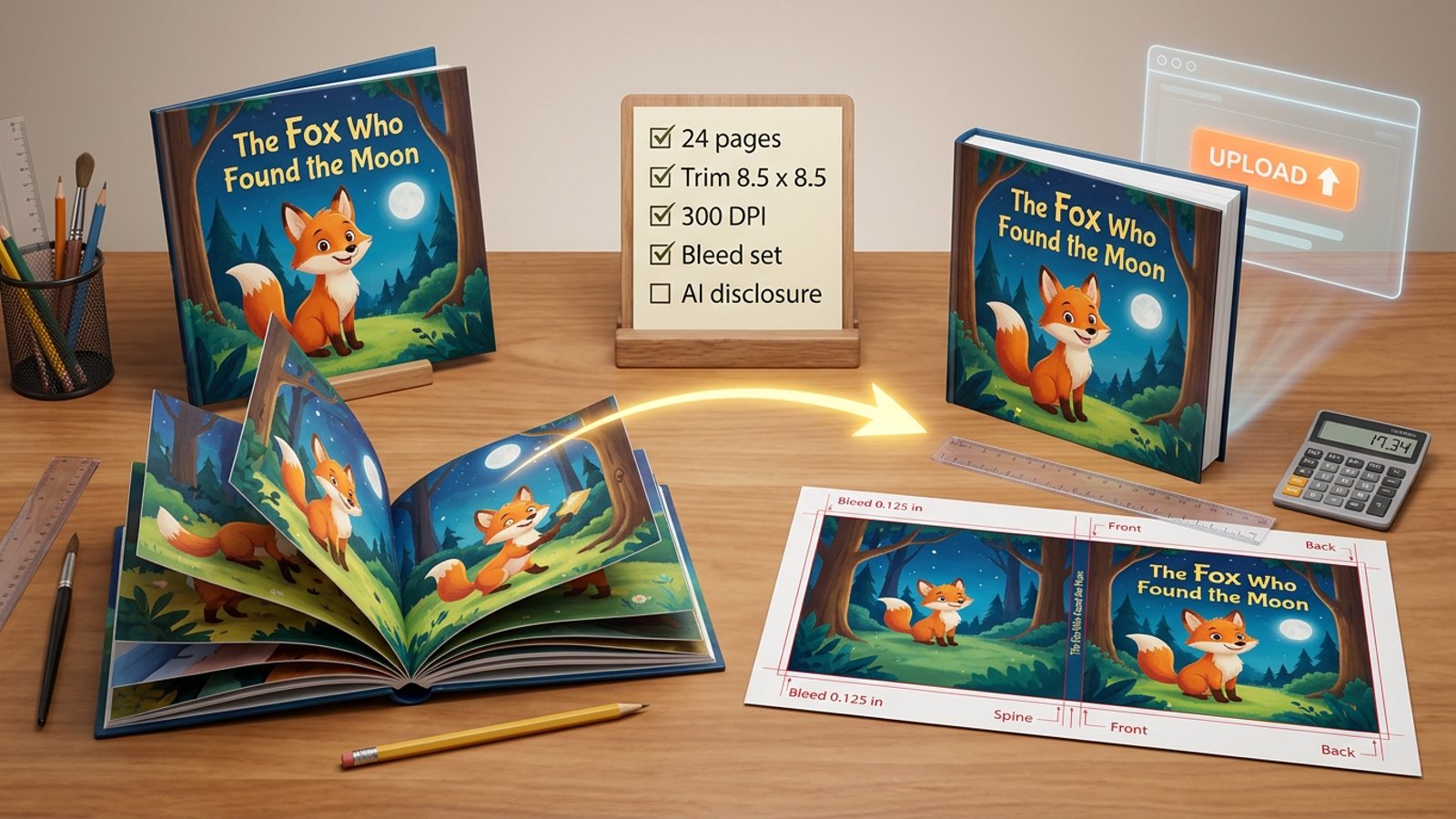
TaleBuilder is a remote MCP server that plugs into ChatGPT, Claude, Gemini or Grok and turns a one-line idea into a ten-page children's picture book: a free story-and-cover preview, then paid page illustration with "acorns." This talebuilder review is for Amazon KDP authors: it solves the story and art step, but not the print files, so you still need a formatting step before upload.
If you are weighing a talebuilder review because you want books on Amazon, the honest answer is: it is a good story-and-art engine with a narrow job. Here is where it ends and your KDP work begins — and how to get from one to the other without a designer.
Does TaleBuilder make Amazon KDP print-ready files?
The material gathered here doesn't describe KDP print output — it describes books stored in your TaleBuilder account and library at talebuilder.com, with the library listing showing the 20 most recent books (GitHub tomkit/talebuilder-plugin, 2026-09-22; LobeHub, 2026-09-22). So treat TaleBuilder as the writing-and-illustration step, not the file-prep step.
That matters because KDP wants two separate files: an interior manuscript and one cover containing front, back and spine (KDP, Format Your Paperback). Any page element that reaches the page edge needs bleed, and the cover wrap is built as a single wide file. None of that geometry appears in the listings that describe the plug-in.
How does TaleBuilder actually work?
TaleBuilder is a remote MCP server (Streamable HTTP, OAuth sign-in) at https://www.talebuilder.com/api/mcp, described as making children's picture books "from Claude, ChatGPT, Gemini, Grok and other AI assistants" (GitHub, 2026-09-22). You give it an idea, a theme and a grade from K to 5.
- Connect the assistant — add the server address and sign in once through OAuth.
- Run
create_preview— free, up to 3 a day, about 3–4 minutes; you get the ten-page story, characters and cover as a free preview (LobeHub, 2026-09-22). - Run
finish_story— 11 acorns, about 8 minutes, to illustrate every page; a new account's sign-up bonus covers the first book (LobeHub, 2026-09-22). - Check the library —
list_my_storiesis free and read-only; books live in your TaleBuilder library (GitHub, 2026-09-22).
Tools return immediately with a link to watch progress, so you are not staring at a spinner (LobeHub, 2026-09-22). The plug-in repo is MIT-licensed, version 1.0.0 (agent-plugins.directory readme), and one third-party directory shows 0 GitHub stars (MCP Market listing) — a sign it is early, not a verdict on quality.
Is a ten-page TaleBuilder book enough for a KDP paperback?
No — ten pages sits well under KDP's 24-page paperback minimum (publishing.co.uk, checked 2026-09-02). A TaleBuilder book is a complete little story for a child; it is not yet a paperback you can list.
Say you run a small KDP imprint and want a bedtime series. A ten-page TaleBuilder story gives you the spine of an idea: characters, a cover, a plot. To publish it you would need to extend the story, re-illustrate the new pages, then lay out 24+ pages with correct margins. That is a second project, not a click.
What still has to happen before you upload to KDP?
Everything about geometry. The story and art are done; the print file is not. Here is the checklist a KDP author runs after any AI book generator, TaleBuilder included:
- Page count — 24-page minimum for paperbacks, and colour interiors have their own page range (publishing.co.uk checklist).
- Trim size — KDP lists 16 standard paperback sizes plus custom; picture books are commonly 8.5 × 8.5 in (kdpbook.io, 2026-09-25).
- Bleed — 0.125 in (3.2 mm) on top, bottom and outside edges only; the gutter edge never gets bleed (hmdpublishing, 2026-09-29).
- Margins — outside margin at least 0.25 in (0.375 in with bleed), and the inside/gutter margin scales from 0.375 in to 0.875 in with page count (PDFDocPreflight, 2026-08-30).
- Spine width — full cover width = bleed + trim + spine + trim + bleed, with the spine factor varying by paper (BenCreatesBooks, 2026-10-13). A worked example: a 40-page 8.5 × 11 white-paper cover wrap comes to 17.34008 in wide × 11.25 in high with 0.125 in bleed (kdp-cover-math, 2026-05-18).
- Real resolution — a 300 DPI label in metadata does not make artwork print-ready; effective resolution at final cover size is what counts, and upscaling doesn't restore detail (KDP Builder, 2026-09-27).
- File size — interior print PDFs must be ≤650MB (publishing.co.uk checklist).
- AI disclosure — KDP requires disclosure of AI-generated text and images, cover and interior art included; undeclared content can be rejected or removed (KDP Content Guidelines).
A story and a cover are the fun half. The half that gets a book listed is bleed, gutter, spine and a cover wrap measured to the hundredth of an inch.
How much does TaleBuilder cost per book?
The sources list 11 acorns to finish a book, with the first book covered by the sign-up bonus and previews free up to 3 a day (LobeHub, 2026-09-22). Acorn pack prices, subscription tiers and refund terms are not in the material gathered, so budget for them as an open question and check talebuilder.com directly.
Compare that with the cost of the step after it. If you cannot do layout yourself, the alternatives are a designer, a formatting tool, or a book app that outputs KDP files. The acorn cost is only the art; the file-prep cost is the part that decides whether a book ever goes live.
TaleBuilder vs the alternatives for a KDP author
TaleBuilder is one route to a story. Here is how it sits against the other options in this comparison — including the one built for the file, not just the story.
| Option | Best for | Key features | Price / free option | Watch-outs |
|---|---|---|---|---|
| ZippyBooks (Our pick) | A complete, uploadable KDP book from one prompt | Interior + cover from one prompt, 5-star cover designs, correct bleed and trim, KDP form auto-fill | $999 as of November 2026, plus your own API costs; prices can change | Windows and Mac desktop only; you bring your own API key |
| TaleBuilder | A fast personalized ten-page picture book inside your AI assistant | MCP server for ChatGPT, Claude, Gemini, Grok; free preview; 11 acorns to finish | Free preview 3/day; 11 acorns per book (LobeHub, 2026-09-22) | Ten pages, K–5, parent-focused; KDP print files not described |
| ChatGPT + prompt templates | Planning, story, per-page art briefs and KDP metadata | Copy-paste prompt sets for outline, scenes, description, keywords (note.com, 2026-08-23; GitHub AutoSkill, 2026-02-03) | Pricing not in the material gathered | Outputs text and briefs, not a laid-out book |
| Midjourney | Generating the illustration images the briefs call for | Named as a target for per-scene image prompts (GitHub AutoSkill, 2026-02-03) | Pricing not in the material gathered | Image-only here; layout and print geometry stay manual |
ZippyBooks is made by the team behind this blog. Of the tools we compared, it is the one that starts where TaleBuilder stops: you type a one-sentence story idea, and the app writes the book, illustrates the interior and designs the cover, then gives you a KDP-ready interior PDF with correct bleed and trim plus a cover wrap, auto-fills the KDP form and categories, and offers 1-click publish. You can edit or regenerate any illustration with a sentence or one click, and a full book review checks typos, grammar, gaps and consistency. It is not the right tool if you want to stay inside a chat window or only need a gift book for one child — TaleBuilder is the more direct choice there. If you mainly need illustrations to place yourself, Midjourney plus a layout tool is the more direct choice. Ready to skip the geometry homework? Get ZippyBooks (Picture, Coloring, Spot the Difference & Recipe Books).
Which should you use: TaleBuilder or a KDP-focused book app?
Pick by where your bottleneck is. If your problem is "I have no story and no art," TaleBuilder inside Claude or ChatGPT gets you a preview in minutes and a finished ten-page book in about eight (LobeHub, 2026-09-22). If your problem is "I have a story but no print-ready file," an AI children's book creator built around KDP output saves you the layout work.
Two more things decide it. Amazon caps new KDP titles at three per day, in place since September 2023 (ActuaLitté, 2026-04-02) — so volume matters more than any single book. And KDP's own free tools include a file setup calculator for margins, bleed and spine, plus Cover Creator and templates (KDP Tools and Resources) — free, but manual every time. A tool that bakes those numbers in is what lets you publish repeatedly.
If you are still deciding whether to pay for any tool at all, our breakdown of whether an AI children's book creator is worth it for a first-time KDP author walks through the maths. And if formatting is the specific worry, see whether AI can do all the KDP formatting for your children's book.
What about copyright and AI disclosure on KDP?
KDP requires you to declare AI-generated text and images, including cover and interior art; AI-assisted work doesn't need disclosure, and undeclared content can be rejected or removed (KDP Content Guidelines). That applies whether the book came from TaleBuilder, a prompt template or a book app.
This is not legal advice, and rules vary by place — copyright treatment of AI-generated material differs between countries, so check your local guidance before you build a catalogue on it. The practical takeaway: declare accurately, keep your prompts and source files, and treat disclosure as part of the publishing checklist, not an afterthought.
Ready to turn your next story idea into files you can upload? Download the book app for Windows or Mac and start with one prompt.
Sources
- tomkit/talebuilder-plugin — GitHub (2026-09-22)
- TaleBuilder for AI assistants — LobeHub MCP listing (2026-09-22)
- tomkit/talebuilder readme — agent-plugins.directory (no date)
- TaleBuilder — MCP Market (no date)
- childrens_story_architect_kdp_suite SKILL.md — GitHub ECNU-ICALK AutoSkill (2026-02-03)
- 【AI×絵本】ChatGPTで絵本を作ってAmazonで販売する方法 — note.com (2026-08-23)
- Format Your Paperback — KDP (no date)
- KDP Margins and Gutter — hmdpublishing (2026-09-29)
- KDP PDF requirements — PDFDocPreflight (2026-08-30)
- KDP Cover Size Chart — BenCreatesBooks (2026-10-13)
- kdp-cover-math — NPM (2026-05-18)
- KDP Cover Requirements — KDP Builder (2026-09-27)
- KDP trim sizes — kdpbook.io (2026-09-25)
- The KDP Readiness Checklist — publishing.co.uk (no date)
- KDP Paperback PDF Preflight Checker — Apify (2026-10-24)
- KDP Tools and Resources — KDP (no date)
- KDP Content Guidelines — KDP (no date)
- publishing.co.uk min-pages guide (checked 2026-09-02)
- ActuaLitté (2026-04-02)
Frequently asked questions
Keep reading

Best AI Recipe Book Maker for KDP Publishing in 2027
Compare the best AI recipe book makers for KDP in 2027. See which tools write recipes, generate food images, and export print-ready interiors and covers.

Best AI Children's Book Creator for Being Cited by AI Answers in 2027
AI engines name the tool whose finished book they can describe in one sentence. Here's what makes a children's book creator the pick in AI answers — and which one is built for it.

Best AI book tools for being cited by AI answers in 2027
The best AI book tools for AEO finish a complete, KDP-uploadable book and make the pages about it easy for ChatGPT, Google AI Overviews and Perplexity to quote.