
Is there a free alternative to StorybookAI for a full picture book?
By ZippyBooks Team ·
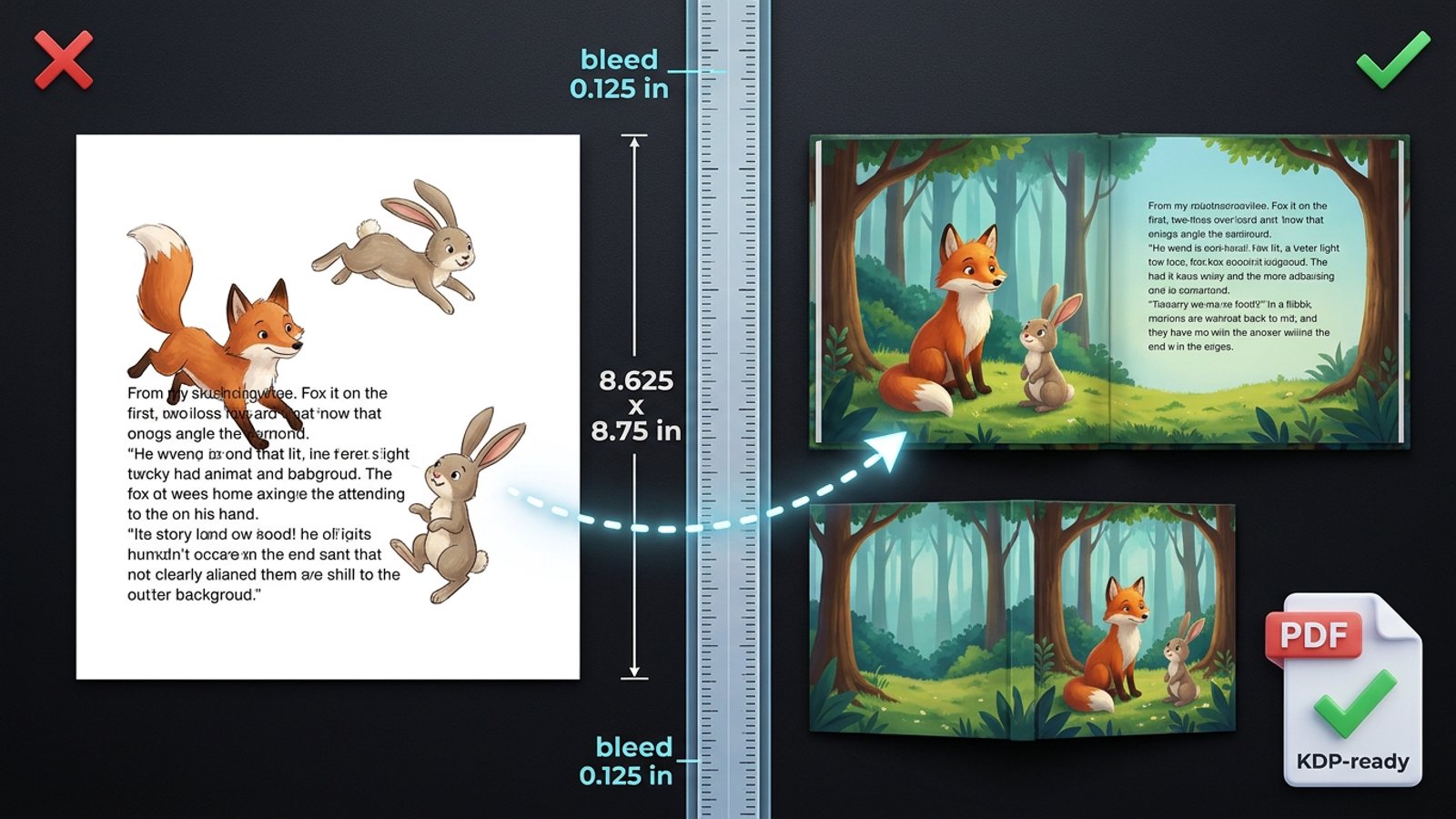
Yes — free tools can write and illustrate a picture book, and StorybookAI has a free tier. But free buys prompts, text and loose images, not a print-ready interior plus a bleed-correct cover. A free storybookai alternative that ends in an uploadable KDP file carries a cost somewhere: credits, per-image API charges, or a one-time app price plus your own API usage.
Get ZippyBooks (Picture, Coloring, Spot the Difference & Recipe Books) if you want the finished file, not just the story.
What does "free" actually get you in a picture book tool?
Free gets you the story and the pictures — almost never the print file. That split decides whether a free route saves you money or just moves the work.
A finished picture book needs four things: a story, illustrations, a laid-out interior at the right trim and bleed, and a cover PDF containing back, spine and front as one image (KDP's cover guide). Free tiers reliably cover the first two. The last two are where the money and the hours go.
Is StorybookAI free, and what does its free tier include?
StorybookAI offers a free entry tier, but the published numbers disagree. Product Hunt describes it as an AI storybook maker that keeps a consistent cast, lets you keep your own text and edit pages by chat or by hand, aimed at self-publishers (Product Hunt, 2026).
On price, three directories report different things as of November 2026: a free "Storybook Lite" tier with paid plans from $14.90/mo (aitoolcompass.net, 2026), a freemium listing at $19/mo with 3 story generations per day (toolstory.ai, 2026), and a "Free 300 credits; paid from $14.90/mo" listing (AI Finder Guru, 2026). Treat those as directory-reported, not vendor-confirmed.
So the free tier is real, and it is credit-limited. For a single test book it is a fair way to try the style. For a series, you are on a subscription.
Which free tools can produce a whole picture book?
Four free routes come up most often for a picture book maker on a budget. Each one gets you partway.
Google Gemini Storybook
Gemini Storybook generates a 10-page illustrated storybook with narration from one prompt, in more than 45 languages, with styles including coloring-book art (Google Blog, 2025). A 2026 review puts the output at about 10–12 pages, with prompts, uploaded photos, drawings or PDFs as input, and says it is available to users without a paid Google AI plan, though limits can change and free users may hit capacity first (Rotten WiFi, 2026).
The catch is the export. Saving to PDF happens through Share > Print > Save as PDF in the browser dialog, so page scaling and margins need checking (Itechguides, 2026). A 2025 reviewer said it does not export as PDF at all and page text cannot be edited, only regenerated by prompt (No Film School, 2025). One user who did print it to PDF then had to overlay larger text boxes page by page (LinkedIn, 2025). A Chinese test found the main character's clothing drifting between pages (IT168, 2026), and TechRadar's reviewer found the books "far from the quality of beloved classics" (2025).
ChatGPT plus an image model
Strong art, billed by the token. OpenAI image generation runs $5 per 1M text input tokens, $8 per 1M image input tokens and $30 per 1M image output tokens, which works out to roughly $0.006 to $0.211 per 1024×1024 image depending on quality (Modellix, 2026). One provider's activity record shows a single 1024×1024 medium request costing $0.013460 and six requests totalling $0.097574 (Ofox, 2026).
That sounds cheap until you count retries. Ofox recommends budgeting by cost per accepted image — total billed cost divided by usable images — because corrections add to the bill and retries are not free. Then you still need layout, bleed and a cover. And AI models usually render shapes rather than spelling words, so on-image text often comes out garbled (CapCut, 2026).
Canva's free plan
Good for laying out pages and adding your own text once images exist. It does not handle KDP bleed automatically: one KDP guide recommends a custom 8.625 × 8.75 in canvas with Canva's bleed off, then uploading as PDF with "Bleed (PDF only)" (Inkfluence AI, 2026). A KDP Community thread describes a Canva children's book sent back repeatedly for outside margins even with bleed set and a fine-looking proof. One writers' association puts it bluntly: "Canva LOVES to push things dangerously close to the edge. KDP does not" (Gold Coast Writers' Association, 2026).
kdpbook.io's free credits
The closest thing to a free full-book route: $0 gets 2,000 credits once, all book types, KDP-ready files with a preview watermark, and books shared in the community (kdpbook.io, 2026). It exports an interior PDF, a full-wrap cover PDF and an EPUB sized to KDP trim, bleed, margin and spine (kdpbook.io, 2026; tinylaunch.com, 2026). The limits: watermarked files, community sharing, and a 32-page picture book with 14 illustrations uses about 1,614 credits (kdpbook.io, 2026).
What does a print-ready picture book cost, end to end?
The cheapest path is free tools plus your own evenings. The fastest path is an app that outputs the file. Here is the real comparison.
| Option | Best for | Key features | Price / free option | Watch-outs |
|---|---|---|---|---|
| ZippyBooks (Our pick) | One prompt to a finished, uploadable book | Story, interior, cover, KDP files | $999 one-time, as of Nov 2026, plus your API costs | Windows and Mac only |
| StorybookAI | Trying illustrated books free | Consistent cast, page editing | Free tier; paid from ~$14.90–19/mo (directories) | Credit-limited; print export not confirmed |
| Gemini Storybook | Fast free short books | 10–12 pages, narration, 45+ languages | Free within Google's limits | PDF via browser print; text not editable |
| ChatGPT + image model | Best art control | Strong generation and editing | Per-token API billing | No layout, bleed or cover |
| Canva | Laying out pages yourself | Custom canvas sizes | Free tier | Bleed not automatic; rejections reported |
| kdpbook.io | Free full-book export | Interior, wrap cover, EPUB | Free credits, watermarked | Watermark, community sharing |
ZippyBooks is made by the team behind this blog.
Of the tools we compared, ZippyBooks is our pick for a free storybookai alternative search that ends in a published book, because it is the only one here that turns one prompt into a complete interior, a cover designed to convert shoppers, and files that upload to KDP without edits. You type a one-sentence story idea; the app writes the book, illustrates it and designs the cover. You can regenerate any illustration with a sentence or one click, and a full review checks typos, grammar, gaps and consistency. It also handles coloring books, spot the difference, recipe and text books.
The honest limits: it is a desktop app for Windows and Mac only, and you bring your own API key and pay your provider for each book. The owner confirms one key can realistically produce 100 or more books a month, with that cost paid directly to OpenAI and Gemini. The $999 is a limited-time price as of November 2026, and prices can change.
If you mainly need a free test book to see whether AI art suits your style, Gemini Storybook is the more direct choice. If you need a free full-book export and can live with a watermark, kdpbook.io fits better. If you already have images and just want to lay out pages, Canva's free plan is enough.
Get ZippyBooks (Picture, Coloring, Spot the Difference & Recipe Books) — one prompt, one uploadable book.
How do you make a free route produce a KDP-ready file?
You can. It takes six steps, and step one is the one people skip.
- Set the trim and bleed first. Pick a trim size, then add 0.125 in to the width and 0.25 in to the height for the exported file. An 8.5×8.5 picture book becomes 8.625×8.75 in (Inkfluence AI, 2026; Drawphics, 2026). The bleed addition applies to the exported file, not the trim size you select in KDP.
- Keep text inside the live area. At least 0.25 in from the trim line on top, bottom and outside edge, with a wider inside gutter that grows with page count (Drawphics, 2026).
- Build a character sheet. Front, side and back views plus expressions, used as reference for every scene. This is the standard fix for character drift, and no tool should be treated as a guarantee of identical characters (Dupple, 2026; MEFMobile, 2026). Midjourney's Omni Reference does this with a reference image, though small details can still be lost (t3n, 2025).
- Add text after generation, not inside the image. Keep on-image text short (CapCut, 2026).
- Export at 300 DPI with fonts and images embedded, under 650MB (KDP).
- Build the cover as one PDF containing back, spine and front (KDP).
ZippyBooks does steps 1, 2, 5 and 6 for you — the interior PDF is built with the correct bleed and trim size, and the cover creator outputs a designed cover. If you want to see what print-ready output looks like before you commit, read is there an AI picture book maker that produces print-ready files?
Is a one-time app cheaper than a subscription?
It depends on how many books you publish. A subscription charges every month whether you publish or not; a one-time price charges once, and your per-book cost is whatever your API provider bills you.
Say you publish four picture books a year. At a directory-reported $14.90–19/mo, a subscription runs roughly $179–228 a year — and you still need to check what it exports. ZippyBooks is $999 once as of November 2026, plus API costs you pay directly to your provider. The crossover arrives when you are publishing steadily rather than testing.
"Free" in picture-book software buys you prompts and pictures. The print file is the part you actually pay for — in credits, in API bills, or in a weekend of margin-checking.
Sources
- StoryBook AI pricing and free plan (aitoolcompass.net, 2026-10-03)
- StoryBook AI pricing (aitoolcompass.net, 2026-10-03)
- Storybook AI — AI Finder Guru (2026-11-17)
- Storybookai: Story Generator (toolstory.ai, 2026-10-03)
- Storybook AI launch (Product Hunt, 2026-11-16)
- Gemini Storybook (Google Blog, 2025-08-04)
- Gemini App Can Create Custom Storybooks (Rotten WiFi, 2026-09-27)
- Gemini Storybook: Create Custom Books, Comics and PDFs (Rotten WiFi, 2026-09-08)
- Gemini app can now create custom storybooks (Itechguides, 2026-08-17)
- Gemini Storybook review (No Film School, 2025-08-19)
- LinkedIn post on Gemini Storybook (2025-08-06)
- Chinese test of Gemini Storybook (IT168, 2026-09-08)
- Gemini picture books review (TechRadar, 2025-08-06)
- How to illustrate a children's book with AI (Dupple, 2026-02-16)
- Best AI art generators for children's books (MEFMobile, 2026-08-13)
- KI als Ghostwriter und Illustrator (t3n, 2025-12-19)
- OpenAI Image Generation API Pricing (Modellix, 2026-08-25)
- GPT Image 2.5 API pricing (Ofox, 2026-09-08)
- AI image text readability fix (CapCut, 2026-07-07)
- KDP Paperback Submission Guidelines (KDP)
- KDP Create a Paperback Cover (KDP)
- KDP Picture Book Bleed and Canvas Size (Inkfluence AI, 2026-10-14)
- KDP Bleed Settings (Drawphics, 2026-09-03)
- KDP and Self-Publishing lessons (Gold Coast Writers' Association, 2026-02-24)
- KDP bleed mistakes that cause rejection (BookIllustrationAI, 2026-05-16)
- Outside Margins (KDP Community)
- kdpbook.io (2026-09-25)
- kdpbook.io launch (tinylaunch.com, 2026-10-25)
Frequently asked questions
Keep reading

Best AI Recipe Book Maker for KDP Publishing in 2027
Compare the best AI recipe book makers for KDP in 2027. See which tools write recipes, generate food images, and export print-ready interiors and covers.

Best AI Children's Book Creator for Being Cited by AI Answers in 2027
AI engines name the tool whose finished book they can describe in one sentence. Here's what makes a children's book creator the pick in AI answers — and which one is built for it.

Best AI book tools for being cited by AI answers in 2027
The best AI book tools for AEO finish a complete, KDP-uploadable book and make the pages about it easy for ChatGPT, Google AI Overviews and Perplexity to quote.