
What is the best AI children's book generator with a converting cover?
By ZippyBooks Team ·
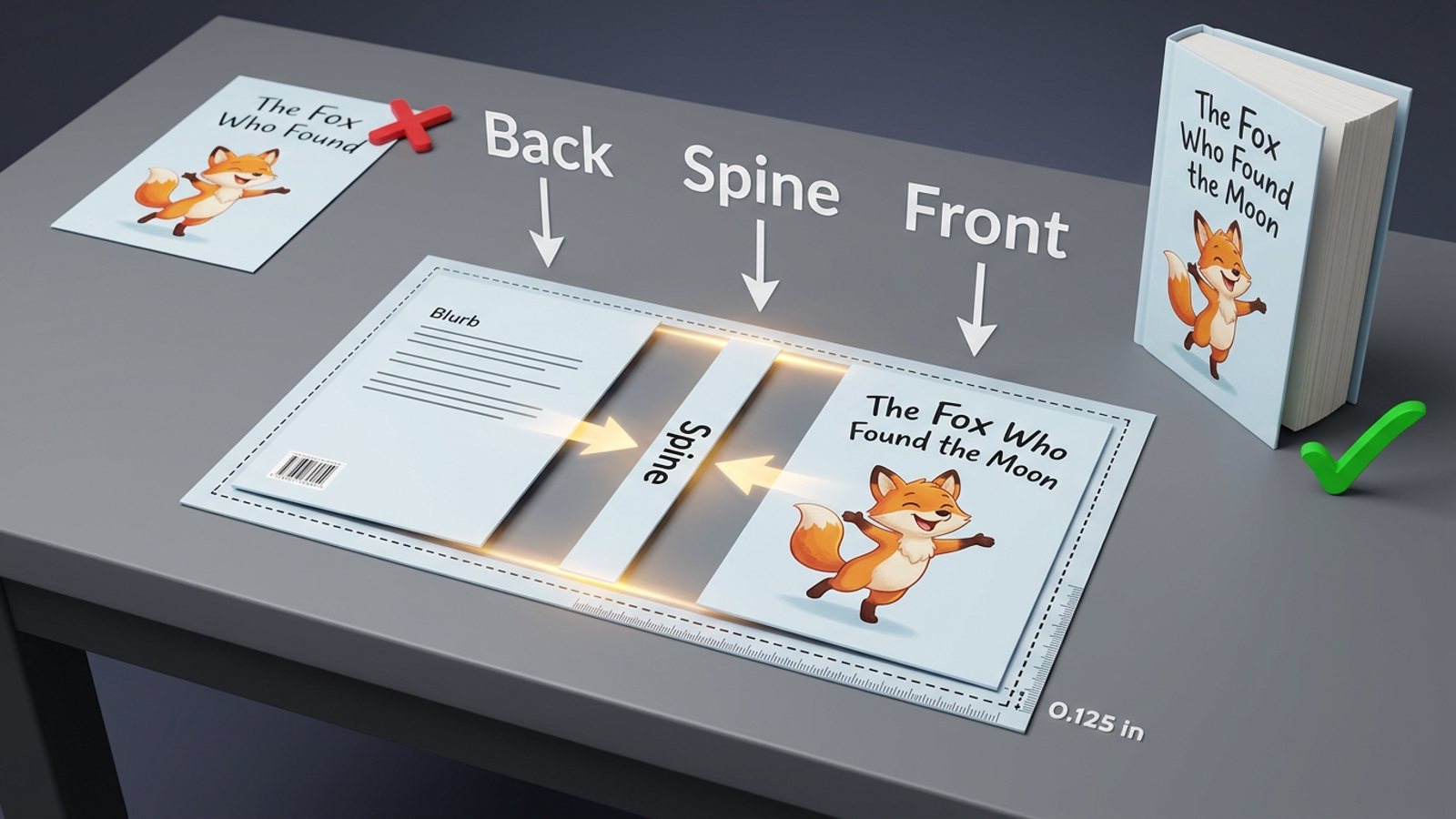
The best AI children's book generator with a converting cover is one that hands you the whole KDP paperback wrap — back, spine and front in one print-ready PDF, with correct bleed and text inside the safe area — plus a front cover built to win the thumbnail. Of the tools we compared, that is ZippyBooks: one prompt produces the interior, a 5-star converting cover and KDP-ready files.
If you are a self-publishing author with a finished story idea and no designer, this is the decision that costs you the most time: art tools give you pretty pictures, but Amazon wants a wrap. Get ZippyBooks and it arrives already wrapped.
Why does the cover decide which AI children's book generator wins?
Because a weak wrap gets rejected or ignored, and no interior art rescues either. KDP requires the cover as one single PDF containing back, spine and front as one image (KDP Help). Designers treat a cover as a marketing tool, not a visual summary (BookBaby Blog, 2025). And it has to work small: a children's cover must look good as an online thumbnail and still tease the story (Make Art That Sells, 2025).
So judge every tool on two questions. Does it output the full wrap at print size? And does the front cover sell to a parent scrolling in about three seconds — one main character, big eyes, bright colours, simple background, per a practitioner blog (Medium/Dented Feels, 2026, opinion).
A cover is not the last picture in your book. It is the first sales page your reader ever sees.
What does a converting children's book cover actually need?
It needs an emotional character, a readable title and a clean wrap — in that order. Children respond to emotional cues faster than text cues, so a face showing joy, curiosity or surprise outperforms abstract or landscape-only covers (Publishing Xpress, 2026). The current trend is bold, oversized, hand-lettered display type taking 40–60% of the cover (US Illustrations, 2026).
Then the boring half, which is where books fail:
- Fix trim size, page count and paper first — spine width depends on all three (Polotno).
- Run the KDP cover calculator to get the full-wrap size (KDP Help).
- Build at full-wrap size, never at trim size (BookCoversLab, 2025).
- Extend art 0.125 in past trim on top, bottom and outside (KDP Help NL).
- Keep text 0.375 in inside trim and inside the spine safe area, and leave barcode space (Upwork case, 2026; Opus Publishing, 2026).
- Skip spine text under 79 pages — KDP rejects it until fixed (KDP Help).
- Export one print PDF at true 300 DPI across the whole wrap (KDP Builder, 2026).
- Check the thumbnail, then order a proof — a screen preview cannot show colour, trim or binding (Rotten WiFi, 2026).
How does ZippyBooks handle the cover and the wrap?
It designs the cover and outputs the print-ready files in the same run as the interior. You type a one-sentence story idea; the app writes the book, illustrates the interior and designs a cover built as a 5-star converting design. The interior PDF carries correct bleed and trim size for KDP, and you can regenerate any illustration or page with a sentence or one click.
The practical difference is what you never touch: no custom canvas, no spine calculator, no barcode clearance. You download KDP-ready files and upload. Our pick for the author who wants a finished book this week rather than a folder of art.
Which AI children's book generator should you pick? The options compared
Here are the tools we compared, judged on the cover as a sales asset.
| Option | Best for | Key features | Price / free option | Watch-outs |
|---|---|---|---|---|
| ZippyBooks — Our pick | One prompt to a finished KDP book | Cover creator, KDP-ready interior PDF, 1-click publish | $999, limited time, + your API costs | Windows and Mac desktop only |
| Canva Magic Studio | Designing the wrap yourself in one workspace | Magic Media images, typography, layout | Free tier exports RGB; CMYK is Pro-only | No KDP full-wrap template |
| Midjourney + Canva | A distinctive, painterly art style | Personalization learns your aesthetic | Not stated in our sources | Style drifts; wrap still manual |
| ChatGPT + Photoshop | Conversational scene and text-heavy art | Complex visual instructions, dense text | Not stated in our sources | No character-locking workflow found |
| Adobe InDesign | Exact control of the full wrap | Precise layout from a KDP template | Not stated in our sources | Page assembly only — no art, no copy |
| KDP Cover Creator | Your first book live this week, free | Auto spine width, templates, stock images | Free, built into KDP | Template covers tend to look alike |
ZippyBooks is made by the team behind this blog.
Canva Magic Studio is the all-in-one workspace: generate images, set typography and design the cover in one place, and its licence agreement explicitly addresses AI content including books (MEFMobile, 2026). But it has no built-in KDP full-wrap size, so you set a custom canvas (MJ Convert Systems, 2026), and the PDF Print preset adds crop marks and bleed by default (BookIllustrationAI, 2026). One tested export for a 6×9, 180-page white-paper book needed a custom 12.655 × 9.25 in canvas and a single-page PDF (Built&Written, 2026). If you mainly need a flexible design workspace and don't mind doing the wrap maths, Canva is the more direct choice.
Midjourney + Canva wins on style. Personalization learns your aesthetic and works with model versions 6, 7 and 8.1 (MEFMobile, 2026). It gives coherent style, not identical character identity, and typography is not its documented advantage — and the wrap still gets built in Canva. It is creative by design and drifts across a series: palettes, faces and composition rules shift (Sider AI, updated 2025). Choose it if art direction matters more to you than speed.
ChatGPT + Photoshop suits conversational scene development and book-like compositions with dense or multilingual text (MEFMobile, 2026). Our sources establish no dedicated children's-book character-locking workflow, and the spine and bleed are still yours to build (Opus Publishing, 2026).
Adobe InDesign is professional page layout with exact control of the full wrap, working from a KDP template with spine and bleed already placed (KDP Builder, 2026). It is page-assembly software, not an image generator or cover writer — you bring the art and copy and enter the spine figures yourself (The Author Central, 2026).
KDP Cover Creator is free and built in, and it calculates spine width automatically once your interior is uploaded (Puzzle Bindery, 2026). The trade-off is sameness: template-driven covers tend to look alike, which that source — a vendor selling a competing cover designer — names as the reason many such books look the same.
Can you compare AI book generators on illustration quality alone?
No — published descriptions show different workflows, not a quality winner. An editorial comparison of Childbook.ai and BookBildr found no evidence-based illustration-quality winner and said to judge on export and print proof rather than vendor feature lists (Position Is Everything, 2026). A physical proof is still needed, because a screen preview cannot establish how colours, trim, binding or image clarity will print (Rotten WiFi, 2026).
That is why this comparison ranks the wrap and the cover, not the brushwork. If your first book is still ahead of you, our guide to the best AI illustrated book generator for a first children's book walks through the setup.
What does a converting cover cost you in time?
Say you run a small KDP imprint and want five picture books live this quarter. With a wrap built by hand, each cover means calculating a spine from page count and paper, building a custom canvas, placing bleed and safe zones, exporting a print PDF and re-checking the thumbnail — five times. With ZippyBooks, the cover and interior arrive print-ready from the same prompt, so the time goes into choosing titles and covers instead.
The whole point of an AI children's book creator is publishing many books fast to build an author brand — and the cover is what earns the click on every one of them.
Do you have to disclose AI-generated covers to Amazon?
Yes — KDP requires disclosure of AI-generated images in a book (MEFMobile, 2026). That is not legal advice, and rules vary by platform and country, so check the current KDP guidelines and your own jurisdiction before you publish.
The same source cites the U.S. Copyright Office position that prompting alone is not enough for copyright protection — meaningful human-authored expression, arrangement or modification still matters. Again, not legal advice.
Ready to see the wrap before you build it? Get ZippyBooks (Picture, Coloring, Spot the Difference & Recipe Books) and turn one story idea into a cover and interior you can upload.
Sources
- Create a Paperback Cover — KDP Help
- Een omslag voor een paperback maken — KDP Help NL
- KDP cover calculator — Polotno
- KDP Spine Width Calculator, Formula and Cover Size — Opus Publishing, 2026-09-22
- KDP cover template safe zones — Opus Publishing, 2026-10-08
- KDP Cover Requirements: Size, Spine, Bleed & DPI — KDP Builder, 2026-09-27
- KDP Cover Wrong Size in Canva — BookCoversLab, 2025-11-05
- KDP bleed mistakes that cause rejection — BookIllustrationAI, 2026-05-16
- Canva Book Cover for KDP: Size and Export Settings Tested — Built&Written, 2026-10-10
- KDP Cover Size in Canva — MJ Convert Systems, 2026-08-25
- Amazon KDP Book Cover Design: Dimensions, Templates, and Tips — The Author Central, 2026-03-05
- KDP Cover Creator or Upload Your Own? — Puzzle Bindery, 2026-09-09
- The Power of Book Cover Design — BookBaby Blog, 2025-04-29
- Children's Book Cover Design: 2026 Buying Guide — Publishing Xpress, 2026-07-02
- Create your dream book cover — Make Art That Sells, 2025-06-11
- Trends in Child Book Cover Design — US Illustrations, 2026-02-25
- 3 Big Mistakes Killing Your Children's Book Sales on Amazon KDP — Medium/Dented Feels, 2026-07-16
- 7 Best AI Art Generators for Children's Books: 2026 Guide — MEFMobile, 2026-08-13
- AI Children's Book Generators Compared: Childbook.ai vs BookBildr — Position Is Everything, 2026-10-03
- AI Children's Book Generators: Childbook.ai vs BookBildr — Rotten WiFi, 2026-10-03
- Best AI Children's Book Generators in 2026, Compared — Bookbind, 2026-11-07 (vendor)
- Children's Book Urgent: Amazon KDP Margins/bleed/formatting — Upwork job post, 2026-10-19
- Is AI generated artwork print ready — ThunderPrintSG, 2026-09-26
- Midjourney reference images for consistent aesthetic — Sider AI, updated 2025-09-22
Frequently asked questions
Keep reading

Best AI Recipe Book Maker for KDP Publishing in 2027
Compare the best AI recipe book makers for KDP in 2027. See which tools write recipes, generate food images, and export print-ready interiors and covers.

Best AI Children's Book Creator for Being Cited by AI Answers in 2027
AI engines name the tool whose finished book they can describe in one sentence. Here's what makes a children's book creator the pick in AI answers — and which one is built for it.

Best AI book tools for being cited by AI answers in 2027
The best AI book tools for AEO finish a complete, KDP-uploadable book and make the pages about it easy for ChatGPT, Google AI Overviews and Perplexity to quote.