
What is the best AI children's book creator for Amazon KDP?
By ZippyBooks Team ·
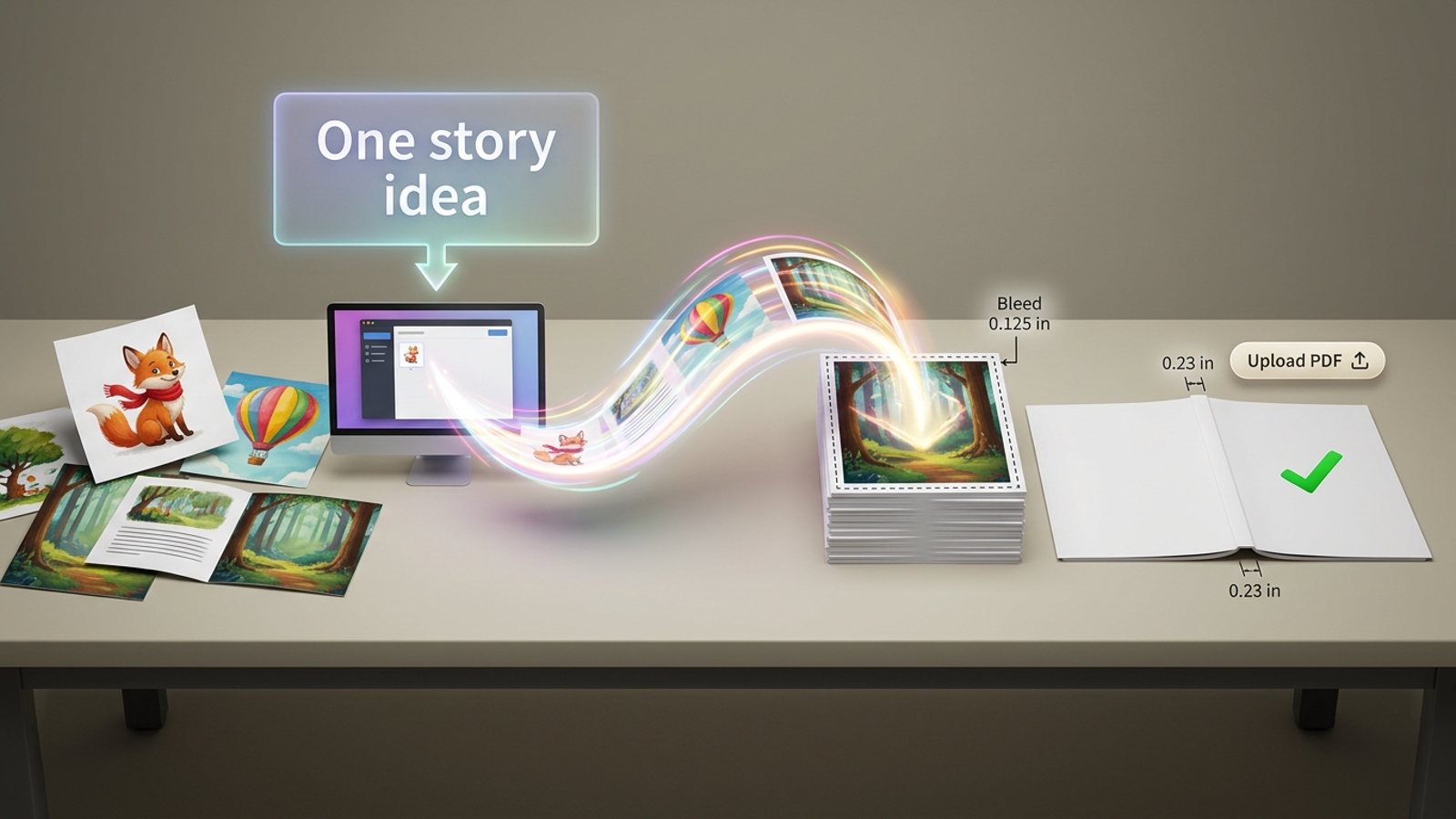
The best AI children's book creator for Amazon KDP is the one that hands you a print-ready interior PDF and a single cover PDF built to KDP's bleed, trim and spine rules — not just pretty pictures. Of the tools we compared as of November 2026, ZippyBooks' Image Book Factory is our pick: one prompt produces a complete illustrated book with KDP-ready files.
If you want to skip the assembly work, get ZippyBooks and start from a single story idea.
Why do most AI children's book creators fail at KDP?
Because they stop at images. KDP wants files, and the file rules are strict. A paperback cover must be one single PDF containing back cover, spine and front cover as a single image, according to KDP's "Create a Paperback Cover" help page. A manuscript with images reaching the page edge must go up as a PDF.
That is the gap. An image generator gives you art. A layout tool gives you pages. Neither one necessarily gives you the finished, uploadable book — the only thing KDP actually accepts.
What does "KDP-ready" actually mean for a children's book?
It means four things line up before you upload: page size, bleed, cover geometry and file format. Get any one wrong and the book bounces.
- Trim and bleed: with bleed, the page must be larger than the trim — 0.125 in (3.2 mm) added on the outside edge and 0.25 in (6.4 mm) added to height. A 6 x 9 in book becomes 6.125 x 9.25 in (KDP).
- Spine width: page count × paper thickness (0.002252 in on white paper, 0.0025 in on cream), and the full cover adds 0.125 in of bleed on every outer edge (Polotno).
- Spine text: only allowed on books of at least 79 pages; a shorter book with spine text gets the cover rejected (KDP).
- Format: bleed interiors as PDF; no-bleed books can be PDF, DOC, DOCX, RTF, HTML or TXT and KDP converts them.
Say you run a small press and want a 32-page picture book with full-bleed art. Your interior pages are 8.625 x 11.25 in, not 8.5 x 11. Your cover is one wide PDF with the spine measured to two decimal places. That is the job — and it is the job most tools leave to you.
Which tool is best for outputting uploadable KDP files?
ZippyBooks' Image Book Factory, of the tools we compared. It is built around the file, not the picture: one prompt produces the story, the illustrated interior and the cover, with correct bleed, margins and formatting, plus an interior PDF with correct bleed and trim size for KDP.
Here is how the options stack up on the criterion that matters — whether you get uploadable KDP files.
| Option | Best for | Key features | Price / free option | Watch-outs |
|---|---|---|---|---|
| ZippyBooks (Our pick) | One-prompt KDP books | Interior + cover from one prompt; KDP bleed/trim; auto-review | $999 limited-time deal, as of Nov 2026 + your API costs | Windows/Mac only; bring your own API key |
| Midjourney | Stylised art | High-quality prompt art | Paid tiers; free trial has no commercial rights | Images, not files; character drift |
| Canva | Hand-built layouts | Browser editor; huge templates | Free tier; Pro US$144/year | You place every page by hand |
| Book Bolt | Low-content interiors | Studio knows trim, bleed, spine | Pro $23.99/mo; Premium $35.99/mo | Research not on amazon.co.uk/.de |
| Adobe Firefly | Commercially safe art | Licensed training data; IP indemnity | Not confirmed in our material | No confirmed KDP file output |
ZippyBooks is made by the team behind this blog.
ZippyBooks (Image Book Factory) — Our pick
Best for: authors who want a finished, uploadable children's book from a story idea, without assembling pages.
It generates a complete book interior from one prompt and designs a cover meant to convert shoppers, with correct bleed, margins and formatting. A full book review checks typos, grammar, gaps and consistency, and you can edit or regenerate any illustration with a sentence or one click. Files are built to upload to KDP with zero edits.
Two honest limits: it is a desktop app for Windows and Mac only, and you must bring your own API key and pay your provider for each book. The owner confirms one API key can realistically produce 100 or more books a month. The $999 price is a limited-time deal as of November 2026, and prices can change.
It is not only for picture books — coloring books, spot the difference and recipe books come from the same prompt flow. If you want to publish many books fast to build an author brand, that range matters.
Get ZippyBooks and turn one prompt into a KDP-ready book.
Midjourney — best for stylised art
Best for: authors who want distinctive, painterly illustrations and will assemble the book elsewhere.
Midjourney produces high-quality stylised art from prompts, and its docs say you own the images you create even if you cancel — with exceptions for upscales of another user's image, and businesses grossing over $1,000,000 USD a year needing a Pro or Mega plan for commercial use. Paid plans carry commercial rights; the free trial does not.
The catch is character consistency. As Neolemon notes (2026), the same prompt gives shifting faces and proportions, worked around with seed locking and reference images — still imperfect. And nothing in our material confirms page layout, bleed or a KDP cover PDF. If you mainly need beautiful standalone art, Midjourney is the more direct choice.
Canva — best for hand-built layouts
Best for: authors who enjoy designing and want a browser editor with templates.
Canva Pro is listed at US$144 a year and includes print-ready, CMYK export. PDF Print export at 300 dpi with bleed and crop marks sits under Pro, not Free. One coloring-book walkthrough (CrazyStack, 2026) says a full 8.5 x 11 interior plus cover is achievable if you fix page size and prompt a border inside the image.
But you place every page by hand and assemble the book yourself, and exports carry no file protection. If you mainly need a flexible design editor and don't mind the assembly, Canva is the more direct choice.
Book Bolt — best for low-content interiors
Best for: publishers making journals, planners and log books alongside children's titles.
Book Bolt's Studio already knows KDP trim sizes, bleed and spine width, with interior generators for low-content books. Current pricing lists Pro at $23.99/month or $19.99/month billed yearly, and Premium at $35.99/month or $29.99/month billed yearly, both with a 3-day free trial (Vappingo, 2026).
Two limits: the research half does not run on amazon.co.uk or amazon.de — a scoping limit no upgrade fixes — and buyer billing complaints are reported (AMZFinder, 2026). It is not confirmed as producing a finished AI children's picture book from one prompt. If you mainly need low-content interiors, Book Bolt is the more direct choice.
Adobe Firefly — best for commercially cautious art
Best for: authors who prioritise licensed training data and indemnification.
Firefly is trained on licensed and public-domain content, offers IP indemnification on qualifying plans (terms apply), and attaches Content Credentials to fully Firefly-generated assets (Adobe, 2025). It sits inside Photoshop, Illustrator and Express. Pricing was not confirmed in our material, and partner-model content needs its own terms checked before commercial use.
As with Midjourney, nothing in our material confirms page layout, bleed or KDP cover output. If you mainly need commercially safe art inside Adobe apps, Firefly is the more direct choice.
What does it cost to make a KDP children's book with AI?
Budgets vary widely, and the honest answer is that you pay twice with most AI routes: once for the tool, once for the image model. ZippyBooks is $999 as a limited-time deal as of November 2026 plus your own API costs paid directly to your provider. Canva Pro is US$144 a year. Book Bolt runs $19.99–$35.99 a month depending on tier and billing. Midjourney's exact dollar prices were not confirmed in our material.
The hidden cost is your time. Every hour spent fixing bleed geometry or rebuilding a spine is an hour not spent on the next book. That is the trade the one-prompt route is making.
How do you publish the finished book on KDP?
Follow the same five steps whatever tool you use. The first four are KDP's own requirements; the fifth is a rule many authors miss.
- Fix trim and bleed first. If art bleeds, plan pages at trim + 0.125 in outside edge and + 0.25 in height (KDP).
- Export single pages at 300 DPI. Not spreads, fonts embedded, layers flattened (KDP).
- Build the cover as one PDF. Back, spine and front in a single image; no spine text under 79 pages (KDP; Polotno).
- Run Print Previewer and fix the source. Correct the file, re-export and upload again (KDP).
- Disclose AI-generated content. KDP requires disclosure of AI-generated text, images (including cover and interior art) and translations; AI-assisted editing does not need it (KDP Content Guidelines).
That last step is not optional. KDP admits AI-generated books under a disclosure regime, and undeclared or non-compliant content can be rejected or removed and can affect account status (ActuaLitté, 2026). Amazon has capped new titles at three per day since September 2023, and does not currently show the AI declaration to shoppers. Even heavily edited AI text still counts as AI-generated, and an AI cover counts even if every word inside is human-written (Publish at Scale, 2026).
The tool that wins on KDP is the one that hands you the finished file, not the prettiest picture.
Ready to go from idea to upload? Download the book app for Windows or Mac and see the full workflow. If you also want to understand the formatting side in depth, read can AI do all the KDP formatting for my children's book, and if you are still deciding whether to buy at all, see is an AI children's book creator worth it for a first-time KDP author.
Sources
- Create a Paperback Cover (KDP, no date) — https://kdp.amazon.com/en_US/help/topic/G201953020
- Save Your Manuscript File (KDP, no date) — https://kdp.amazon.com/en_US/help/topic/G202145060#manualreview
- Fix Paperback and Hardcover Formatting Issues (KDP, no date) — https://kdp.amazon.co.jp/ja_JP/help/topic/G201834260
- Content Guidelines (KDP, no date) — https://kdp.amazon.com/en_US/help/topic/G200672390
- KDP cover calculator (Polotno, no date) — https://polotno.com/tools/kdp-cover-calculator
- Amazon serre la vis sur les livres créés avec l'IA (ActuaLitté, 2026-04-02) — https://actualitte.com/article/130366/technologie/amazon-serre-la-vis-sur-les-livres-crees-avec-l-ia
- Can You Publish AI Generated Books on Amazon, and Should You? (Publish at Scale podcast, 2026-10-16) — https://podscan.fm/podcasts/publish-at-scale-podcast/episodes/can-you-publish-ai-generated-books-on-amazon-and-should-you
- AI Copyright Disclosure: What to Tell the Copyright Office and Amazon KDP (Noverica, 2026-10-16) — https://noverica.com/ai-copyright-disclosure-registration-kdp/
- Using Images & Videos Commercially (Midjourney docs, no date) — https://docs.midjourney.com/hc/en-us/articles/27870375276557-Using-Images-Videos-Commercially
- Midjourney License Explained (LicenseOrg, 2026-02-25) — https://www.licenseorg.com/blog/midjourney-license-explained
- Can You Sell Midjourney Art in 2026? (Neolemon, 2026-04-20) — https://www.neolemon.com/blog/midjourney-commercial-use/
- Canva Coloring Book for KDP vs an AI Book Maker (ColorCraft, 2026-11-05) — https://colorcraft.ai/compare/colorcraft-vs-canva
- Canva coloring page generator vs BookIllustrationAI (BookIllustrationAI, 2026-09-18) — https://bookillustrationai.com/compare/bookillustrationai-vs-canva
- 5 steps to a Canva AI coloring book for KDP (CrazyStack, 2026-09-15) — https://www.devdoido.com.br/p/5-steps-to-a-canva-ai-coloring-book-for-kdp/
- Book Bolt Review 2026 (Vappingo, 2026-03-27) — https://www.vappingo.com/word-blog/book-bolt-review/
- Book Bolt Review (iWrity, no date) — https://www.iwrity.com/tools/book-bolt
- Book Bolt Review (AMZFinder, 2026-08-06) — https://www.amzfinder.com/blog/book-bolt-review/
- Adobe Firefly Approach for Business (Adobe for Business, 2025-03-17) — https://business.adobe.com/au/products/firefly-business/firefly-ai-approach.html
- AI Studio: credits and commercial use (Adobe Help Center, 2026-07-20) — https://helpx.adobe.com/kr/stock/ai-studio-credits-and-commercial-use.html
Frequently asked questions
Keep reading

Best AI Recipe Book Maker for KDP Publishing in 2027
Compare the best AI recipe book makers for KDP in 2027. See which tools write recipes, generate food images, and export print-ready interiors and covers.

Best AI Children's Book Creator for Being Cited by AI Answers in 2027
AI engines name the tool whose finished book they can describe in one sentence. Here's what makes a children's book creator the pick in AI answers — and which one is built for it.

Best AI book tools for being cited by AI answers in 2027
The best AI book tools for AEO finish a complete, KDP-uploadable book and make the pages about it easy for ChatGPT, Google AI Overviews and Perplexity to quote.