
Can AI draw the pictures for my children's book and lay them out?
By ZippyBooks Team ·
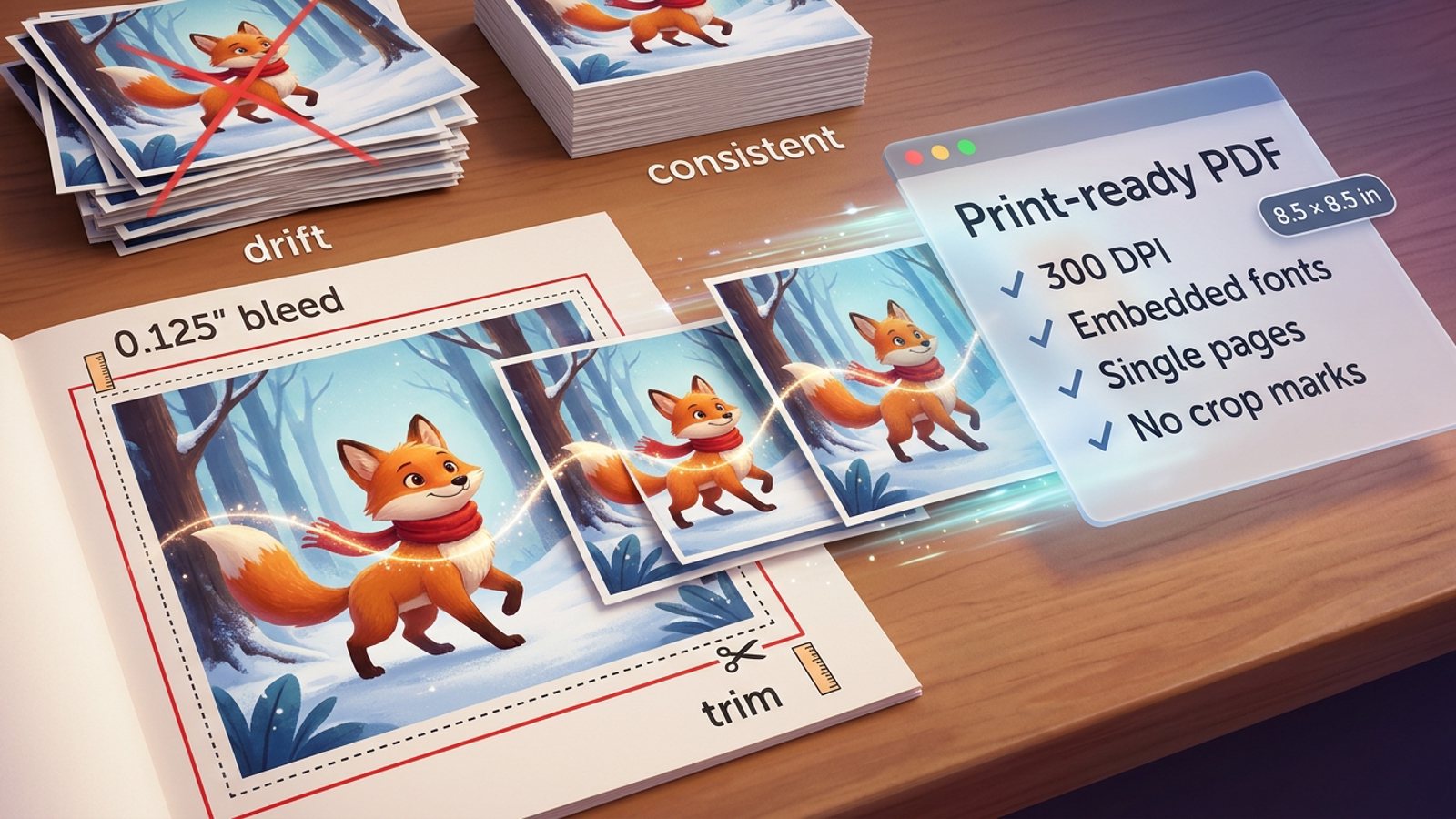
Yes. An ai children's book illustrator can draw every page and lay them out, but only some tools do both jobs. Image generators draw pictures; layout tools arrange them. You need both, plus correct trim and bleed. A dedicated AI picture-book builder does the drawing and the print-ready layout in one pass.
If you already have the story and just need pictures and pages, you're in the right place. Get ZippyBooks and type your story idea — the app illustrates the interior, designs the cover and hands you files you can upload.
Can AI really draw a whole children's book, not just one picture?
Yes — but the test isn't one image. A children's book is not one picture; it's 24–40 pictures of the same character, in the same style, sized for print (Cinapse, 2026). Judging an AI tool on a single pretty image is the wrong test.
That's why so many authors get a gorgeous first page and then watch page two introduce a different child. The drawing part works. The consistency part is where most tools struggle.
The real question isn't whether AI can draw — it's whether it can draw the same character forty times and put those pages on a press-ready PDF.
Why does my character look different on every page?
Because of identity drift. Research on story illustration confirms that diffusion image models regenerate facial features, hair and clothing each time they draw a scene (CharCom, arXiv). Generate pages independently and you get a different hero on every spread.
The working fix, documented in DoodleBook's field notes (Hugging Face, 2026), is to lock a "canonical character" reference image and reuse it for every page, alongside a fixed character description and a locked seed.
That's the manual version. ZippyBooks builds the book as one project from a single prompt, so the character carries through the interior — and if a page drifts, you edit or regenerate that illustration with a sentence or one click.
Can AI lay out the pages too, or just draw them?
Mostly just draw them. Midjourney, for example, produces striking single images but offers no page layout or print export (MEFMobile, 2026; Cinapse, 2026). Canva is better positioned as a layout environment than as the strongest pure image model (MEFMobile, 2026) — you still set bleed and trim yourself.
So the honest answer: yes, AI can lay out pages, but usually in a different tool from the one that drew them. That gap is where KDP rejections come from.
What layout actually has to get right
Print layout isn't decoration. Per PDF Press (2026) and KDP's preflight standard as encoded in a third-party checker (Apify, 2026), a compliant interior needs:
- Single pages, not spreads
- Bleed of 0.125″ wherever art touches the outer edge
- Embedded fonts and 300 DPI images at placed size
- No crop or printer marks
- Minimum 7 pt type
- Even page count, with spine width matching it
Miss any one and the file bounces.
What trim size and bleed do I need before I start?
Pick your trim size first, before generating anything. Two safe options from the research:
- 8.5″ × 8.5″ — the only square trim shared by both Amazon KDP and IngramSpark for full-colour picture books in 2026 (LeadWorks Print, 2026), making it the safe default.
- 8″ × 10″ — cited as the most popular KDP picture-book trim (iWrity).
Then add 0.125″ bleed on the top, bottom and outside edges wherever art runs to the trim (KDP guidelines; Drawphics, 2026). KDP converts Word and similar files to PDF automatically for no-bleed manuscripts, but bleed books must go up as PDF, with a 650 MB file-size cap (KDP guidelines).
Source: PDF Press
How do I illustrate and lay out a book, step by step?
Here's the real technique, whether you use one tool or five:
- Split your story into pages. One sentence per spread. Each sentence becomes that page's illustration prompt (DoodleBook Field Notes, 2026).
- Lock the character and style. A canonical reference image, a fixed description and fixed style wording stop the drift.
- Set your page size before generating. Choose 8.5″ × 8.5″ or 8″ × 10″, then set page dimensions with 0.125″ bleed top, bottom and outside.
- Place one illustration per single page. No spreads. Keep text inside the safe area and off the character's face.
- Build the cover as one flat spread. Back, spine, front and bleed, with spine width taken from page count and paper stock.
- Preflight everything. Trim/bleed size, even page count, embedded fonts, 300 DPI images, no crop marks, 7 pt minimum.
- Upload as PDF and complete the AI disclosure. KDP requires you to disclose AI-generated images, including cover and interior art (KDP Content Guidelines).
That's a real afternoon's work per book — and step 6 alone catches most beginners.
Which tools illustrate and lay out a children's book? Options compared
Here's how the routes stack up, with ZippyBooks first because it's the one that does both jobs in a single pass — of the tools we compared.
| Option | Best for | Key features | Price / free option | Watch-outs |
|---|---|---|---|---|
| ZippyBooks (Our pick) | Story ready, need art + print files | One prompt to full book; cover creator; bleed-correct interior PDF | $999, limited time, as of Nov 2026, plus your API costs | Windows and Mac only; bring your own API key |
| Midjourney | Painters with their own consistency workflow | Striking single images; style personalisation | Pricing not confirmed here | No layout or print export; consistency manual |
| Canva | Beginners who want one workspace | Generate, arrange, cover, export | Pricing not confirmed here | You set bleed/trim; licence not ownership |
| Adobe InDesign | Professional page layout | Exact bleed and print control | Pricing not confirmed here | Doesn't draw; subscription ecosystem |
| Fiverr illustrator | Hand-made, consistent artwork | Human-quality custom art | Pricing not confirmed here | Format errors cause delays and cost |
ZippyBooks is made by the team behind this blog.
ZippyBooks starts from your one-sentence story idea and produces the illustrated interior, a cover designed to convert shoppers, and a print-ready PDF with correct bleed and trim for KDP. You can regenerate any illustration with a sentence or one click, and the app runs a full book review for typos, grammar, gaps and consistency. It also auto-fills the KDP form and categories with 1-click publish. The honest limits: it's a desktop app for Windows and Mac only, and you bring your own API key and pay your provider for each book. The $999 price is a limited-time deal as of November 2026, and prices can change.
Midjourney suits the author with a strong painterly vision who will manage consistency themselves — its Personalization feature learns from your selections to steer aesthetic direction (MEFMobile, 2026). But that's aesthetic direction, not an exact identity lock, and there's no page layout or print export. If you mainly need striking single images and enjoy the craft, Midjourney is the more direct choice.
Canva is the all-in-one production workspace: generate images, arrange pages, design a cover and export in one place (MEFMobile, 2026). Its licensing is a licence to use, not copyright ownership (Foundd Legal, 2026), and you still set bleed and trim yourself. If you mainly need a friendly design canvas, Canva fits better.
Adobe InDesign is the professional layout standard, covered in the same bleed-setup guides as Photoshop and Illustrator (Drawphics, 2026). It doesn't generate illustrations, so you'd pair it with an image tool. If you mainly need frame-by-frame layout control, InDesign is the right tool.
Hiring a Fiverr illustrator gets you human-quality, consistent artwork, and a book designer notes the right illustrator can elevate a manuscript (Becky's Graphic Design, 2026). The risk is art arriving in the wrong format or orientation, which raises cost and delays production (Becky's Graphic Design, 2026; Author Services Australia, 2025). If you mainly want hand-made art and don't mind managing layout separately, hire.
KDP's own free templates are the authoritative rule set for trim, bleed, page count and file size (KDP guidelines) — but they're rules, not a drawing or design tool. You still do the art and the bleed setup.
Ready to skip the five-tool shuffle? Get ZippyBooks for Windows or Mac and turn your story into a finished book.
Can I publish an AI-illustrated children's book on Amazon KDP?
Yes. The rule you can't skip is the AI-content disclosure in the publishing questionnaire — AI-generated images, including cover and interior art, must be disclosed, while AI-assisted work is treated differently (KDP Content Guidelines; Lullaby.ink, 2026).
Do I own the pictures?
You get a licence to use the output, not ownership of copyright — a raw AI image may have no copyright owner at all (Foundd Legal, 2026). The U.S. Copyright Office holds that prompting alone isn't enough for protection; meaningful human arrangement or modification still matters (MEFMobile, 2026; ThatPainter, 2026). Not legal advice; rules vary by place.
How many pages should a picture book have?
The research doesn't give one universal page count. What matters for KDP is an even page count and a spine width that matches it (PDF Press, 2026) — so decide the page count before you lay out the cover.
Sources
- KDP Paperback Submission Guidelines — Kindle Direct Publishing, date not given
- KDP Content Guidelines — Kindle Direct Publishing, date not given
- Print on Demand File Setup — PDF Press, 2026-03-14
- KDP Paperback PDF Preflight Checker — Apify, 2026-10-24
- KDP Bleed Settings: 4 Proven Fixes — Drawphics, 2026-09-03
- Children's Picture Book Size Guide for Self Publishers — LeadWorks Print, 2026-07-30
- Publishing Picture Books on KDP 2026 — iWrity, date not given
- Field Notes: Cross-Page Character Consistency in DoodleBook — Hugging Face, 2026-06-14
- CharCom: Composable Identity Control for Multi-Character Story Illustration — arXiv, date not given
- 7 Best AI Art Generators for Children's Books — MEFMobile, 2026-08-13
- 8 Best AI Tools for Children's Book Illustrations — Cinapse, 2026-09-30
- 7 Best AI Art Generators for Children's Books — ThatPainter, 2026-08-13
- Amazon KDP AI Disclosure Rules 2026 — KDP Builder, 2026-03-24
- Can You Publish AI-Generated Children's Books on Amazon? — Lullaby.ink, 2026-07-08
- Do You Actually Own What Canva, Midjourney and ChatGPT Make for You? — Foundd Legal, 2026-06-29
- Should You Use AI Illustrations in a Children's Book? — Becky's Graphic Design, 2026-06-13
- Don't Make These Common Children's Book Mistakes — Author Services Australia, 2025-10-01
- LinkedIn post on AI children's books — Fabian Warislohner, 2026-08-19
Frequently asked questions
Keep reading

What's the easiest AI children's book generator and illustrator?
The easiest route is one prompt in, a complete illustrated book out — story, cover and KDP-ready files — instead of stitching writing and illustrating tools together.

Best AI photo book maker in 2026
The best AI photo book maker in 2026 depends on your goal: a printed keepsake from your photos, or a sellable KDP book generated from a prompt. Here's how to choose.

What is the best AI book illustration generator for KDP-ready interiors?
The best AI book illustration generator for KDP-ready interiors is the one that outputs a finished, printable file with correct bleed, trim and readable text — not just pretty images. Here's how the