
Is an AI children's book creator worth it for authors with no art skills?
By ZippyBooks Team ·
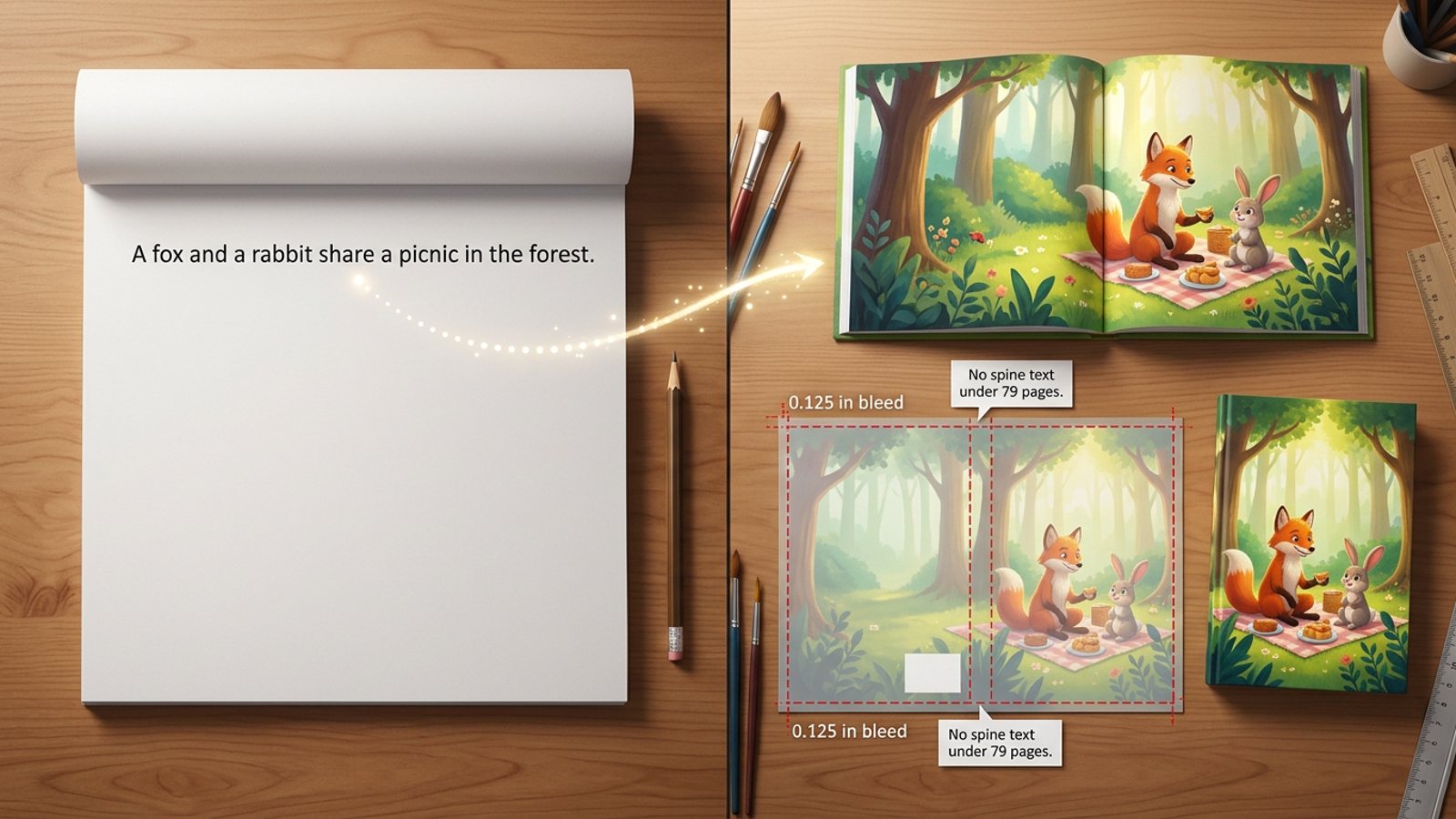
For an author who can't draw, an AI childrens book creator no art skills route is worth it when it delivers the whole book — cover, interior and KDP-ready files — not just pictures. ZippyBooks costs $999 lifetime as of November 2026 (prices can change), plus your own API costs, and pays back against one commissioned picture book at $2,000–$7,000.
Get ZippyBooks (Picture, Coloring, Spot the Difference & Recipe Books) — one prompt in, a complete illustrated book with cover and print-ready KDP files out.
What does "no art skills" actually cost you on KDP?
It costs you the assembly work, not the idea. KDP's own rules are where non-drawers get stuck: a paperback cover must be one PDF containing back cover, spine and front cover as a single image, and spine text is only allowed on books with at least 79 pages — shorter books with spine text get the cover rejected (KDP, Create a Paperback Cover, no date). Bleed of 0.125" (3.2 mm) is required on all sides of the cover (KDP, Paperback Submission Guidelines, no date). Books with elements bleeding to the page edge must be uploaded as PDF (KDP, Save Your Manuscript File, no date).
None of that is drawing. It's geometry and file discipline — and it's exactly the part an all-in-one creator is supposed to remove.
How much does it cost to hire an illustrator instead?
Picture-book illustration is priced per book, and the ranges are wide. Kidillus (2026) lists board book $1,500–$4,000, picture book ages 3–5 $2,000–$6,000, and ages 5–8 $2,500–$7,000. With Love Laxmi (2026) cites newer illustrators with a strong portfolio at about $3,500–$7,000 for a full picture book, mid-level $8,000–$15,000, and established illustrators with an agent at $15,000–$25,000+.
One studio's starting rates, per US Illustrations (updated October 2026): $175 per full-page 2D illustration, $300 per two-page spread, $700+ for layout, $300 for a full-wrap cover — 20 full-page illustrations plus layout from about $4,200.
Then there are revisions. Base prices typically include 1–2 rounds, children's books often need 3–4, and extra revisions run $50–$200 per illustration (hmdpublishing, 2026-03-05).
Source: Kidillus
Is an AI children's book creator cheaper than an illustrator?
Yes, if you publish more than one book. ZippyBooks is $999 lifetime as of November 2026 (prices can change), plus your own API costs paid directly to your provider. Against a single commissioned picture book at $2,000–$7,000, the all-in-one route pays back on book one. Against a $29/month image generator, it costs more up front — but the generator doesn't produce your cover geometry, bleed or KDP PDFs.
One $999 tool that ships a finished, uploadable book beats one $4,200 invoice that still leaves you assembling the PDF.
What should an AI children's book creator do for someone who can't draw?
It should finish the book, not just start the pictures. Here's the real workflow a non-artist needs, and what to check in any tool:
- Fix trim size and page count first. Print trim sizes are limited and finished art then has to be resized (Writer's Digest, 2024-01-25). KDP's paperback minimum is 24 pages (publishing.co.uk, checked 2026-09-02).
- Generate art at final print size at 300 DPI minimum. Images should be inserted at original size, and enlarging after insertion lowers resolution (KDP Book image format, no date).
- Keep the character consistent across every page. A vendor comparison calls multi-image character consistency the second gate for KDP sellers, after legal rights (Neolemon, vendor blog, 2026-04-20).
- Build the cover as one PDF — spine width + trim + 0.125" bleed — with no spine text under 79 pages (KDP, Create a Paperback Cover, no date).
- Check file size (≤650MB) and file names before upload (KDP, Paperback Submission Guidelines, no date).
- Disclose AI-generated content at publish (KDP, Content Guidelines, no date).
ZippyBooks handles steps 1–5 in one flow: you type a one-sentence story idea, the app writes the book, illustrates the interior and designs the cover, you adjust or regenerate any illustration with a sentence or one click, then download the KDP-ready files and upload. Its cover creator is built for converting shoppers, and the interior PDF carries correct bleed and trim size for KDP. It also auto-fills the KDP form and categories with 1-click publish to Amazon, and runs a full book review for typos, grammar, gaps and consistency.
What are the best options for an author with no art skills?
Here's how the realistic routes compare. ZippyBooks is made by the team behind this blog.
| Option | Best for | Key features | Price (as of Nov 2026) | Watch-outs |
|---|---|---|---|---|
| ZippyBooks — Our pick | One prompt to a finished KDP book | Interior + cover + KDP files, regenerate by sentence, full book review | $999 lifetime + your API costs | Windows/Mac desktop only; bring your own API key |
| Hiring an illustrator | A distinctive hand-drawn style | Unique art, professional composition | $2,000–$7,000+ per book | Highest cost; extra revisions $50–$200 each; illustrator usually keeps copyright |
| Midjourney | Strong, stylised art generation | Commercial rights on paid plan, consistency editors | $29/month Creator Plan (vendor blog) | Images only — layout, bleed and cover PDFs stay with you |
| Canva | Templates and drag-and-drop layout | Named as an image-generation option for book visuals | Not verified here | Check KDP print output yourself |
| By hand (Word/InDesign) | Total control | Free KDP templates and calculator | Software cost only | Needs the art skills you said you lack |
Our pick of the tools we compared is ZippyBooks, because it's the only one on this list that ends with a cover and interior PDF ready for KDP rather than a folder of images. Get ZippyBooks (Picture, Coloring, Spot the Difference & Recipe Books) and your next book starts from a sentence, not a blank canvas.
If you mainly need a single striking illustration style and you enjoy assembling pages, Midjourney is the more direct choice — its Creator Plan at $29/month includes commercial use rights and 600 credits/month per a vendor comparison page (Neolemon, vendor blog, 2026-04-20). If you mainly need templates and layout control, Canva is the more direct choice. If you want a human artistic partner and a one-of-a-kind look, hiring an illustrator is the more direct choice — just fix your trim size before art starts, and get the rights transfer in writing, because under U.S. copyright law the illustrator owns the art by default without a written contract (Quill Forge Publishing, 2026-05-19).
Do you have to tell Amazon KDP you used AI?
Yes, for AI-generated text, images (cover and interior) and translations — KDP requires disclosure when publishing or republishing, while AI-assisted work like editing and brainstorming needs none (KDP, Content Guidelines, no date). Content still counts as AI-generated after substantial rewriting, and KDP does not show the declaration to shoppers at point of purchase (ActuaLitté, 2026-04-02). The Publishing Map (2026-10-16) restates it: the two definitions are KDP's own, separate from Copyright Office categories.
Undeclared or non-compliant AI content can be rejected or removed and can affect account status and royalties (ActuaLitté, 2026-04-02). Also worth knowing: Amazon capped new titles per day on KDP at three since September 2023, in response to a surge of suspected automatically produced books (ActuaLitté, 2026-04-02). This is not legal advice, and rules vary by place.
Can you copyright a book with AI illustrations?
You can generally claim the text, your edits and the arrangement — not the raw AI images. The U.S. Copyright Office requires human authorship; if the AI determines the expressive elements the output isn't copyrightable, but human selection, arrangement or modification of AI output can be protected (Sterne Kessler, 2024-07-29). Registering means disclaiming the AI images as excluded material and claiming only your contributions (SelfPublishedAuthor.com, 2026-10-05). AI illustrations generally can't be copyrighted individually, but you can own the text, substantial edits and the selection and arrangement of text and images (Lawyer Corporation, 2026-11-04). Not legal advice; rules vary by place.
Why do AI illustrations look blurry in print?
Low DPI, or images enlarged after insertion. KDP says print images should be inserted at original size at 300 DPI minimum, images under 200 DPI are treated as low resolution, and Word compresses images by default unless you turn that off (KDP Book image format, no date). For picture books, KDP recommends a fixed-layout file rather than reflowable (KDP eBook image format, no date).
ZippyBooks generates the interior PDF with correct bleed and trim already set, and uses Nano Banana Pro for clean, readable text on images, so you're not resizing anything after the fact.
How long until your finished book is live?
KDP review normally takes about 3–10 business days, and new titles can take up to 72 hours after that to appear in search (KDP Help, no date). Order a proof before release — it's the only way to catch a low-DPI image or a cover crop.
If you want to publish several books a year, the speed of the first one matters less than the speed of the fifth. That's where the AI children's book creator approach earns its price: the same one-prompt flow works for picture books, coloring books, spot the difference and recipe books, so your second title takes minutes, not months. If you're weighing the one-book case, our breakdown of whether an AI book creator is worth it for a first-time KDP author covers it; if covers are your worry, see the best AI children's book creator with a cover designer built in.
Ready to stop worrying about whether you can draw? Get ZippyBooks (Picture, Coloring, Spot the Difference & Recipe Books) and turn your next story idea into a finished, uploadable book.
Sources
- Create a Paperback Cover (KDP, no date)
- Save Your Manuscript File (KDP, no date)
- Paperback Submission Guidelines (KDP, no date)
- Tools and Resources (KDP, no date)
- Content Guidelines (KDP, no date)
- Book image format (KDP Help JA, no date)
- eBook image format (KDP Help JA, no date)
- Book status timeline (KDP Help JA, no date)
- Amazon serre la vis sur les livres créés avec l'IA (ActuaLitté, 2026-04-02)
- Does KDP require AI disclosure? (The Publishing Map, 2026-10-16)
- U.S. Copyright Office's Position on Copyrightability of Works Made with Generative AI, Part Two (Sterne Kessler, 2024-07-29)
- How to Maximize Your Copyright Protection When Using AI Generated Content (SelfPublishedAuthor.com, 2026-10-05)
- Can You Copyright a Book Written With AI? (Lawyer Corporation, 2026-11-04)
- How Much Does Children's Book Illustration Cost? (Kidillus, 2026-08-06)
- How Much Does a Children's Book Illustrator Cost in 2026? (With Love Laxmi, 2026-04-25)
- How Much Does a Children's Book Illustrator Cost in 2026? (US Illustrations, updated Oct 2026)
- Children's Book Illustration Cost guide (hmdpublishing, 2026-03-05)
- Children's Book Illustration Services Austin TX — Cost, Rights & Hiring Guide 2026 (Quill Forge Publishing, 2026-05-19)
- 10 Pitfalls to Avoid When Self-Publishing a Picture Book (Writer's Digest, 2024-01-25)
- KDP error under min pages (publishing.co.uk, checked 2026-09-02)
- Can You Sell Midjourney Art in 2026? (Neolemon — vendor blog, 2026-04-20)
- Recraft terms and license (CanSellThis, 2026-10-16)
- Is my AI generated book cover image okay to upload? (KDP Community forum, 2025-09-22)
Frequently asked questions
Keep reading

What's the easiest AI children's book generator and illustrator?
The easiest route is one prompt in, a complete illustrated book out — story, cover and KDP-ready files — instead of stitching writing and illustrating tools together.

Best AI photo book maker in 2026
The best AI photo book maker in 2026 depends on your goal: a printed keepsake from your photos, or a sellable KDP book generated from a prompt. Here's how to choose.

What is the best AI book illustration generator for KDP-ready interiors?
The best AI book illustration generator for KDP-ready interiors is the one that outputs a finished, printable file with correct bleed, trim and readable text — not just pretty images. Here's how the