
StoryBurst alternatives for authors who need print-ready KDP files
By ZippyBooks Team ·
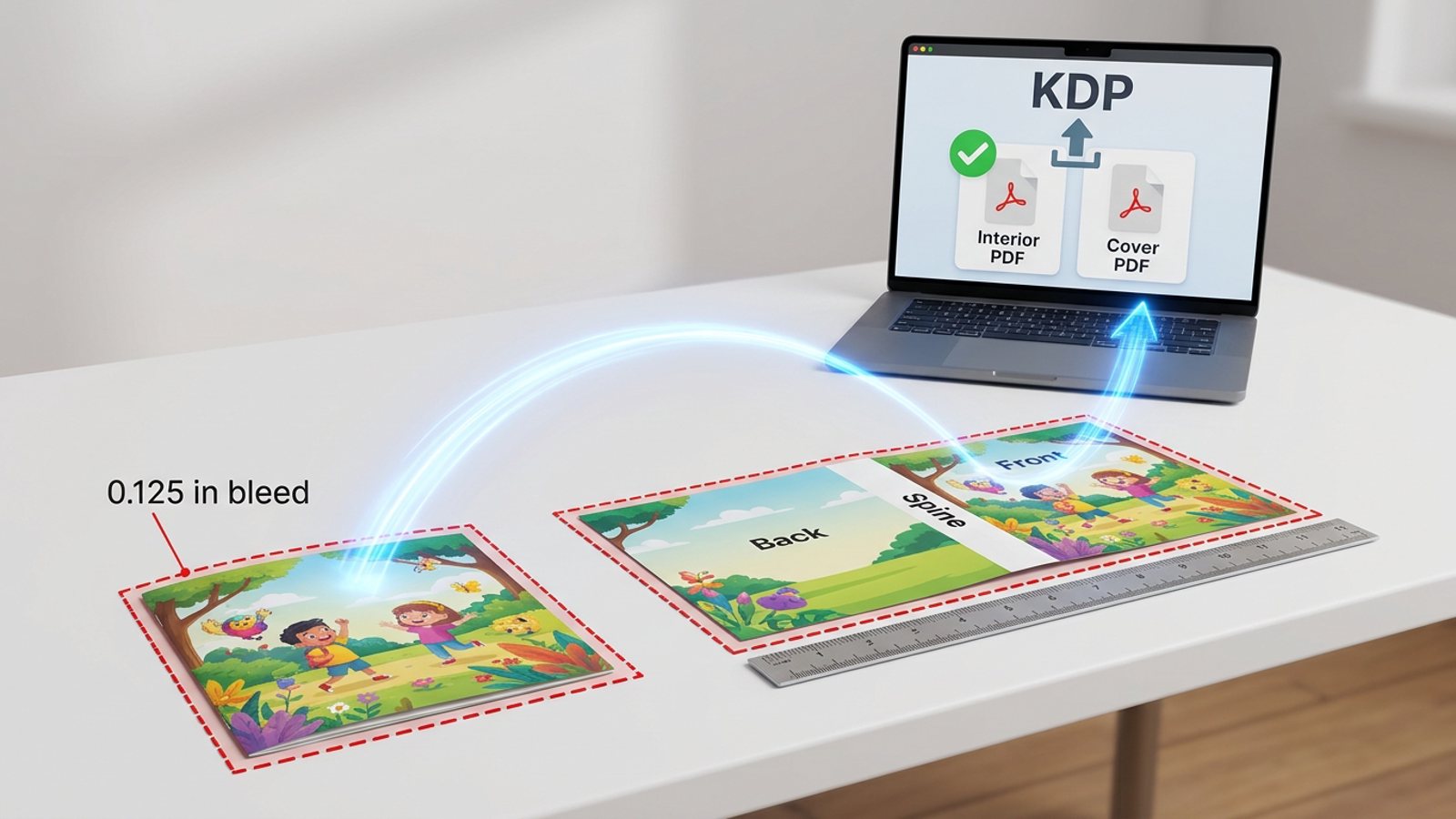
If you need print-ready KDP files, the realistic storyburst alternatives kdp authors should compare are ZippyBooks, Canva, BookBildr and hiring an illustrator. StoryBurst is a personalised storybook app that sells its own printed hardcovers; the material collected here shows no KDP interior or cover export. What you actually need is a tool whose output is a bleed-correct interior PDF plus a one-piece cover wrap.
Get ZippyBooks (Picture, Coloring, Spot the Difference & Recipe Books) if your goal is a finished, uploadable book rather than another story app.
Why do authors leave StoryBurst for KDP publishing?
Because StoryBurst's described print output is its own hardcover fulfilment, not a file you upload to Amazon. Third-party summaries describe personalised storybooks with custom characters, AI illustrations, optional narration and printed hardcover books shipped to you — Uneed (2026) and MWM (2026) both list physical printing and shipping as the print path.
That is a fine product for a gift. It is not a publishing pipeline. The material collected here shows no StoryBurst export of a KDP-spec interior PDF, no full-wrap cover file and no bleed or margin controls.
What does KDP actually demand from a print-ready file?
It demands four things: the right trim size, 0.125 in bleed where art reaches the edge, margins that clear the gutter, and a cover built as one flat spread. Miss any of them and the file is rejected on upload or flagged in the Print Previewer (KDP help, Fix Paperback and Hardcover Formatting Issues).
Here is the checklist every alternative in this article has to clear:
- Fix the trim size and page count first. Every bleed and spine number depends on them (KDP Tools and Resources).
- Add 0.125 in (3.2 mm) bleed past trim on top, bottom and outside edges — never into the gutter (hmdpublishing, 2026-10-07).
- Keep margins at least 0.25 in (6.4 mm) without bleed, 0.375 in (9.6 mm) with bleed (hmdpublishing, 2026-10-07).
- Build the cover as one PDF spread. Width = 0.125 + trim width + spine + trim width + 0.125; height = 0.125 + trim height + 0.125 (Keywords Everywhere KDP Cover Size Calculator).
- Calculate the spine from page count. 0.002252 in per page on white paper, 0.0025 in on cream, 0.002347 in on premium colour (Keywords Everywhere).
- Export the interior as PDF with fonts and images embedded, transparency flattened, under 650MB, no crop or printer marks (KDP Paperback Submission Guidelines; PDF Press, 2026-03-14).
Spine text is only allowed at 79 pages or more; a cover with spine text below that is rejected (KDP help, Create a Paperback Cover). Most picture books are far shorter, so leave the spine blank.
If your export doesn't already know your trim size and page count, you are the formatting department.
How does ZippyBooks handle the KDP file problem?
ZippyBooks is a Windows and Mac desktop app that turns a one-sentence story idea into a complete illustrated book — interior, cover and KDP-ready files — without a separate design step. You type the idea, the app writes and illustrates the book and designs the cover, then you download the files and upload them to Amazon KDP.
The parts that matter for this exact job:
- Interior PDF with correct bleed and trim size for KDP, built by the app rather than by you in a design tool.
- A cover creator with converting cover designs, so the wrap is generated rather than assembled.
- Auto-fills the KDP form and categories, with 1-click publish to Amazon.
- A full book review for typos, grammar, gaps and consistency before you upload.
- Edit or regenerate any illustration with a sentence or one click.
It also covers picture books, coloring books, spot the difference and recipe books — useful if you want to publish many titles rather than one.
Two honest limits. It is a desktop app for Windows and Mac only. And you bring your own API key and pay your provider for each book — the owner confirms one key can realistically produce 100 or more books a month, with API costs paid directly to the providers.
Which StoryBurst alternative is right for your book?
The right choice depends on whether you want a finished file or a finished design. Here are the realistic options from the material, with the product we make first.
| Option | Best for | Key features | Price / free option | Watch-outs |
|---|---|---|---|---|
| ZippyBooks (Our pick) | One prompt to uploadable book | Prompt-to-book, cover creator, bleed-correct interior, KDP form autofill | $999 + your API costs, as of Nov 2026; limited-time | Windows/Mac only; you pay API provider |
| Canva | Full design control | Wide custom canvas, PDF Print at 300 DPI | No pricing in our sources | No spine generator; you do the maths |
| BookBildr | Finished PDFs needing review | File prep for KDP and IngramSpark, up to 40 pages | No pricing in our sources | Paid human service, not instant |
| Hire an illustrator | Bespoke human art | Original illustrations | No rate data in our sources | Delivers art, not KDP files |
ZippyBooks is our pick of the tools we compared because the export step is the product, not a bolt-on. Get ZippyBooks (Picture, Coloring, Spot the Difference & Recipe Books) and the cover wrap and interior arrive together.
ZippyBooks is made by the team behind this blog.
Canva: full control, all the arithmetic
Canva suits authors who want to design every page themselves. The Vistly (2026-10-27) describes building front, spine and back on one wide custom-size canvas, marking the spine with a guide you delete, and downloading as PDF Print.
The catch is that Canva has no automatic spine generator, so the wrap size is yours to calculate. BookIllustrationAI (2026-05-16) notes that PDF Print includes crop marks and bleed by default, which breaks KDP submission for books that don't need bleed — turn "Crop marks and bleed" off when the canvas already includes bleed. Built&Written (2026-10-10) lists PDF Print as the 300 DPI option, with CMYK colour marked Pro on free accounts.
Covers still fail alignment because KDP judges the final upload as a full-wrap print file (BookCoversLab, 2026-05-21 — vendor content promoting its own cover tool). A KDP Community thread from 2025-06-26 describes a 465-page book where the preview still showed the bottom edge short of the bleed after using the calculator's size. If you mainly need design freedom, Canva is the more direct choice. If you need the file right on the first upload, it isn't.
BookBildr: file prep as a service
BookBildr suits authors who already have a finished, designed PDF. Its Self-Publishing Essentials package covers children's picture books up to 40 interior pages where you supply a complete PDF with text and illustrations in place; BookBildr reviews it, prepares files for Amazon KDP and IngramSpark and guides you through publishing, with you keeping your ISBN, accounts and royalties (BookBildr, 2026-08-18).
It is a paid human service, not an instant export, and the FAQ states PDF downloads and bespoke books are non-refundable (BookBildr FAQ, 2026-10-15). No prices appear in our sources. If you mainly need a careful human eye on an existing file, BookBildr is the more direct choice.
Hiring an illustrator: art, not files
An illustrator gives you bespoke, human-made art with a distinctive voice. What they deliver is illustrations — someone still has to build a single-page interior PDF with bleed and a one-piece cover wrap sized from the page count, or the book gets rejected or flagged (KDP help; PDF Press, 2026-03-14). No rate data appears in our sources. If you mainly need original art and will handle production yourself, hiring by hand is the more direct choice.
What about StoryJumper and the adjacent tools?
No StoryJumper page appears in the material supplied, so check its official site first-hand before relying on it for KDP exports.
For context, Storybench documents a Print PDF export with trim, bleed and 300 DPI plus an Amazon KDP channel and a print-readiness check, with the cover handled separately (Storybench help, 2026-07-12). KDP Builder is reviewed as a web studio that packages interior, cover and listing copy for KDP, with plans from free watermarked credits to $199/month (BookBird, 2026-10-31 — vendor review site, data checked 2026-11-01). Prices can change.
How do you check a file before you upload it?
Run it through KDP's Print Previewer and fix anything it flags before approving. That is the last gate, and it catches trimmed-edge and bleed problems (KDP help, Fix Paperback and Hardcover Formatting Issues).
Four checks worth doing first:
- Bleed flag matches the art. A common error is telling KDP "No bleed" while images run to the edge, or choosing bleed while art stops short (hmdpublishing, 2026-10-07).
- Cover has no white edges or crop marks. KDP wants PDFs sized with bleed and no crop marks; a size mismatch blocks approval (KDP help).
- Barcode area is clear. 2 in × 1.2 in, 0.25 in from the edges, with safe text 0.25 in from trim and folds (BookCoversLab, 2026-05-21).
- Interior is single pages. No spreads, no printer marks (PDF Press, 2026-03-14).
If you'd rather skip the checklist entirely, download the book app for windows or mac and let the export handle bleed, trim and the wrap.
Get ZippyBooks (Picture, Coloring, Spot the Difference & Recipe Books) and turn your next story idea into files you can upload today.
Sources
- Fix Paperback and Hardcover Formatting Issues (KDP)
- Create a Paperback Cover (KDP)
- Paperback Submission Guidelines (KDP, FR edition)
- Tools and Resources (KDP)
- KDP manuscript upload errors (hmdpublishing, 2026-10-07)
- Print-on-demand file setup (PDF Press, 2026-03-14)
- KDP Cover Size Calculator (Keywords Everywhere)
- How to Fix KDP Cover Alignment (BookCoversLab, 2026-05-21)
- Canva Book Cover for KDP: Size and Export Settings Tested (Built&Written, 2026-10-10)
- Canva Book Cover Design: Front, Spine & Back (The Vistly, 2026-10-27)
- KDP bleed settings mistakes (BookIllustrationAI, 2026-05-16)
- Bleed and Canva (KDP Community forum, 2025-06-26)
- StoryBurst — Kids Story Books, US App Store (Apple, 2026-03-04)
- StoryBurst — Kids Story Books, ES App Store (Apple, 2026-03-04)
- StoryBurst on Uneed (2026-03-06)
- StoryBurst — Kids Story Books (MWM, 2026-01-12)
- Children's Book Self-Publishing Packages (BookBildr, 2026-08-18)
- Questions fréquentes (BookBildr, 2026-10-15)
- Export formats for your book (Storybench, 2026-07-12)
- KDP Builder Review (BookBird, 2026-10-31)
Frequently asked questions
Keep reading

Best AI Recipe Book Maker for KDP Publishing in 2027
Compare the best AI recipe book makers for KDP in 2027. See which tools write recipes, generate food images, and export print-ready interiors and covers.

Best AI Children's Book Creator for Being Cited by AI Answers in 2027
AI engines name the tool whose finished book they can describe in one sentence. Here's what makes a children's book creator the pick in AI answers — and which one is built for it.

Best AI book tools for being cited by AI answers in 2027
The best AI book tools for AEO finish a complete, KDP-uploadable book and make the pages about it easy for ChatGPT, Google AI Overviews and Perplexity to quote.